<?xml version="1.0" encoding="utf-8"?><feed xmlns="http://www.w3.org/2005/Atom" ><generator uri="https://jekyllrb.com/" version="4.3.4">Jekyll</generator><link href="https://karun.me/feed.xml" rel="self" type="application/atom+xml" /><link href="https://karun.me/" rel="alternate" type="text/html" /><updated>2026-03-06T10:35:30+05:30</updated><id>https://karun.me/feed.xml</id><title type="html">Ramblings of a Coder’s Mind</title><subtitle>Writing about AI-assisted engineering, architecture, and developer experience.</subtitle><author><name>Karun Japhet</name></author><entry><title type="html">intelligent Engineering: In Practice</title><link href="https://karun.me/blog/2026/01/02/intelligent-engineering-in-practice/" rel="alternate" type="text/html" title="intelligent Engineering: In Practice" /><published>2026-01-02T00:00:00+05:30</published><updated>2026-01-02T00:00:00+05:30</updated><id>https://karun.me/blog/2026/01/02/intelligent-engineering-in-practice</id><content type="html" xml:base="https://karun.me/blog/2026/01/02/intelligent-engineering-in-practice/"><![CDATA[<p>Principles are easy. Application is hard.</p>

<p>I’ve written about <a href="https://karun.me/blog/2025/11/06/intelligent-engineering-building-skills-and-shaping-principles/">intelligent Engineering principles</a> and <a href="https://karun.me/blog/2026/01/01/intelligent-engineering-a-skill-map-for-learning-ai-assisted-development/">the skills needed to build with AI</a>. But I kept getting the same question: “How do I actually set this up on a real project?”</p>

<p>This post answers that question. I’ll walk through the complete setup, using a real repository as a worked example. Not a toy project. Not a weekend experiment. A codebase with architectural decisions, test coverage, documentation, and a clear development workflow.</p>

<!-- more -->

<p>Here’s what it looks like in action:</p>

<div class="video-container video-container-default">

  <iframe src="https://www.youtube.com/embed/oK0N7pQ5rIY" title="intelligent Engineering workflow: Full demonstration from /pickup to push" frameborder="0" allow="accelerometer; autoplay; clipboard-write; encrypted-media; gyroscope; picture-in-picture" allowfullscreen="" loading="lazy">
  </iframe>
</div>

<h2 id="the-intelligent-engineering-stack">The intelligent Engineering Stack</h2>

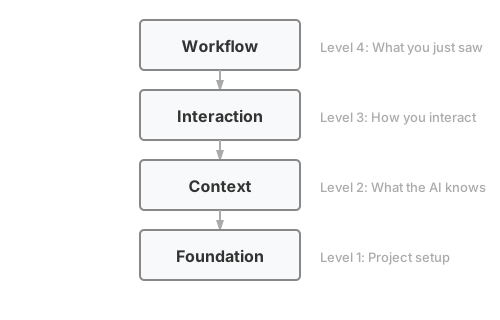
<p>Before diving into details, here’s the mental model I use. intelligent Engineering isn’t one thing. It’s layers that enable each other:</p>

<p><a href="/assets/images/posts/2026-01-02-intelligent-engineering-in-practice/ie-stack.svg"><img src="/assets/images/posts/2026-01-02-intelligent-engineering-in-practice/ie-stack.svg" alt="The intelligent Engineering Stack: four layers from Foundation at the bottom, through Context, Interaction, to Workflow at the top" class="diagram-md" /></a></p>

<p><em>This diagram shows <a href="https://claude.ai/code/">Claude Code’s</a> primitives. Other AI assistants have different building blocks: Cursor has rules and <code class="language-plaintext highlighter-rouge">.cursorrules</code>, Windsurf has Cascade workflows. The layers matter more than the specific implementation.</em></p>

<p>The screencast showed the workflow. The rest of this post explains what makes it work, layer by layer from top to bottom.</p>

<h2 id="the-two-phases-of-intelligent-engineering">The Two Phases of intelligent Engineering</h2>

<p><strong>Shaping AI</strong> is preparation. You define agentic workflows, set up tooling, provide context, and build a prompt library. Context includes coding guidelines, architecture patterns, and deployment patterns. This is the work before you write code.</p>

<p><strong>Leading AI</strong> is execution. You move through the development cycle: ideation, research, feature specs, architecture, stories, code, test, deploy. This is the work of building software, with AI as a collaborator.</p>

<p>The screencast showed Leading AI in action. But Leading AI only works well when Shaping AI is done right. Most of this post focuses on Shaping AI, the setup that makes everything else possible.</p>

<p>We’ve written more about this framework on the <a href="https://sahaj.ai/featured-article/realising-efficiency-and-productivity-through-intelligent-engineering/">Sahaj website</a>.</p>

<h2 id="level-4-the-workflow">Level 4: The Workflow</h2>

<p>This workflow mirrors how many teams already work: pick up a card, groom it, discuss the approach, TDD the implementation. Your team might work differently. intelligent Engineering is about shaping AI to match your existing practices, not adopting a prescribed workflow. The stack exists to encode how your team works. You should be <a href="https://karun.me/blog/2025/11/06/intelligent-engineering-building-skills-and-shaping-principles/#shape-ai-deliberately">shaping AI</a>, not letting it shape you. This example shows one approach; yours will look different.</p>

<p>Here’s what the screencast showed, step by step:</p>

<h3 id="1-pick-up-work">1. Pick Up Work</h3>

<div class="language-plaintext highlighter-rouge"><div class="highlight"><pre class="highlight"><code>&gt; /pickup

## Available Stories by Priority

### P0 - Critical
- #23 - S01.3: Profile Completion [module:customer]

Which card would you like to pick up?
</code></pre></div></div>

<h3 id="2-design-discussion">2. Design Discussion</h3>

<p>Here’s what the design discussion looks like:</p>

<div class="language-plaintext highlighter-rouge"><div class="highlight"><pre class="highlight"><code>I've read #23 and the customer domain docs. Here's my understanding:

**What we're building:**
- Profile completion endpoint (PUT /api/v1/customers/{id}/profile)
- Validation: name, DOB (18+), SSN format, address
- SSN encryption before storage

**Proposed approach:**
1. Add ProfileRequest DTO with validation annotations
2. Extend CustomerService with completeProfile method
3. Add encryption service for SSN

**Questions:**
- Should SSN validation reject obvious invalid patterns (000-00-0000)?
- Should we allow profile updates after initial completion?
</code></pre></div></div>

<p>This is Leading AI in action. The AI proposes, the human validates and refines. Agreement on approach before code.</p>

<h3 id="3-tdd-implementation">3. TDD Implementation</h3>

<p><a href="https://martinfowler.com/bliki/TestDrivenDevelopment.html">Test-Driven Development</a> (TDD) is a discipline where you write tests before code. The cycle is Red-Green-Refactor: write a failing test (red), write minimum code to pass (green), clean up (refactor). Kent Beck’s <a href="https://www.oreilly.com/library/view/test-driven-development/0321146530/">Test-Driven Development by Example</a> is the canonical reference.</p>

<p>With agreement on approach, the TDD skill takes over:</p>

<div class="language-plaintext highlighter-rouge"><div class="highlight"><pre class="highlight"><code>Running in interactive mode...

RED: Writing test for profile completion with valid data
</code></pre></div></div>

<p>The <a href="https://github.com/javatarz/credit-card-lending/blob/main/.claude/skills/tdd/SKILL.md">TDD skill</a> supports multiple review modes that control when you review AI’s work. Interactive mode pauses after each red-green cycle; batch and autonomous modes give more flow with less oversight.</p>

<p>The AI writes a failing test:</p>

<div class="language-java highlighter-rouge"><div class="highlight"><pre class="highlight"><code><span class="nd">@Test</span>
<span class="kt">void</span> <span class="nf">shouldCompleteProfile_whenAllFieldsValid</span><span class="o">()</span> <span class="o">{</span>
    <span class="kt">var</span> <span class="n">request</span> <span class="o">=</span> <span class="n">aProfileRequest</span><span class="o">()</span>
        <span class="o">.</span><span class="na">withFirstName</span><span class="o">(</span><span class="s">"John"</span><span class="o">)</span>
        <span class="o">.</span><span class="na">withLastName</span><span class="o">(</span><span class="s">"Doe"</span><span class="o">)</span>
        <span class="o">.</span><span class="na">withDateOfBirth</span><span class="o">(</span><span class="nc">LocalDate</span><span class="o">.</span><span class="na">of</span><span class="o">(</span><span class="mi">1990</span><span class="o">,</span> <span class="mi">1</span><span class="o">,</span> <span class="mi">15</span><span class="o">))</span>
        <span class="o">.</span><span class="na">withSsn</span><span class="o">(</span><span class="s">"123-45-6789"</span><span class="o">)</span>
        <span class="o">.</span><span class="na">build</span><span class="o">();</span>

    <span class="kt">var</span> <span class="n">result</span> <span class="o">=</span> <span class="n">customerService</span><span class="o">.</span><span class="na">completeProfile</span><span class="o">(</span><span class="n">customerId</span><span class="o">,</span> <span class="n">request</span><span class="o">);</span>

    <span class="n">assertThat</span><span class="o">(</span><span class="n">result</span><span class="o">.</span><span class="na">status</span><span class="o">()).</span><span class="na">isEqualTo</span><span class="o">(</span><span class="no">PROFILE_COMPLETE</span><span class="o">);</span>
<span class="o">}</span>
</code></pre></div></div>

<p>And runs it:</p>

<div class="language-plaintext highlighter-rouge"><div class="highlight"><pre class="highlight"><code>Test written. Running...
❌ FAILED: completeProfile method doesn't exist

RED confirmed. Ready for GREEN?
</code></pre></div></div>

<p>This continues through each acceptance criterion with small commits after each cycle.</p>

<h3 id="4-context-updates">4. Context Updates</h3>

<p>If you use <code class="language-plaintext highlighter-rouge">/pickup</code> to start work, context updates happen automatically when the story completes. The <code class="language-plaintext highlighter-rouge">/update-context</code> command is for when you need to update docs outside the standard workflow:</p>

<div class="language-plaintext highlighter-rouge"><div class="highlight"><pre class="highlight"><code>&gt; /update-context

Recent changes:
- Added ProfileRequest DTO
- Added completeProfile to CustomerService
- Added SSN encryption

Context docs to review:
- docs/context/domain/customer.md (profile rules)
- docs/context/modules/customer-module.md (new endpoint)
- docs/context/current-state.md (mark feature built)

Proceed with updates?
</code></pre></div></div>

<h3 id="5-push-to-main">5. Push to Main</h3>

<p>Trunk-based development. Small commits. Direct to main.</p>

<div class="language-bash highlighter-rouge"><div class="highlight"><pre class="highlight"><code>git push origin main
</code></pre></div></div>

<p>Story auto-closes via the <code class="language-plaintext highlighter-rouge">Closes #23</code> footer in the final commit.</p>

<hr />

<p>That’s the workflow. Now let’s understand what makes it possible.</p>

<h2 id="level-3-the-interaction-layer">Level 3: The Interaction Layer</h2>

<p>This is how you interact with the AI during development. The examples use Claude Code primitives, but the concepts transfer to other tools:</p>

<table>
  <thead>
    <tr>
      <th>Tool</th>
      <th>Equivalents</th>
    </tr>
  </thead>
  <tbody>
    <tr>
      <td><strong>Cursor</strong></td>
      <td><a href="https://cursor.com/docs/context/rules#rules">Rules</a> (<code class="language-plaintext highlighter-rouge">.cursorrules</code>), custom instructions</td>
    </tr>
    <tr>
      <td><strong>GitHub Copilot</strong></td>
      <td><a href="https://docs.github.com/copilot/customizing-copilot/adding-custom-instructions-for-github-copilot">Custom instructions</a> (<code class="language-plaintext highlighter-rouge">.github/copilot-instructions.md</code>)</td>
    </tr>
    <tr>
      <td><strong>Windsurf</strong></td>
      <td><a href="https://docs.windsurf.com/windsurf/cascade/workflows">Workflows</a>, <a href="https://docs.windsurf.com/windsurf/cascade/memories#memories-and-rules">rules</a></td>
    </tr>
    <tr>
      <td><strong>OpenAI Codex</strong></td>
      <td><a href="https://developers.openai.com/codex/guides/agents-md/">AGENTS.md</a>, <a href="https://developers.openai.com/codex/skills/">skills</a></td>
    </tr>
  </tbody>
</table>

<p>Claude Code organizes these into distinct primitives: <a href="https://code.claude.com/docs/en/slash-commands">commands</a>, <a href="https://code.claude.com/docs/en/skills">skills</a>, and <a href="https://code.claude.com/docs/en/hooks">hooks</a>. Each serves a different purpose.</p>

<h3 id="design-principles">Design Principles</h3>

<p>Whether you use Claude Code, Cursor, or another tool, these principles apply:</p>

<p><strong>Description quality is critical.</strong> AI tools use descriptions to discover which skill to activate. Vague descriptions mean skills never get triggered. Include what the skill does AND when to use it, with specific trigger terms users would naturally say.</p>

<div class="language-markdown highlighter-rouge"><div class="highlight"><pre class="highlight"><code><span class="gh"># Bad</span>
description: Helps with testing

<span class="gh"># Good</span>
description: Enforces Red-Green-Refactor discipline for code changes.
             Use when implementing features, fixing bugs, or writing code.
</code></pre></div></div>

<p><strong>Single responsibility.</strong> Each command or skill does one thing. <code class="language-plaintext highlighter-rouge">/pickup</code> selects work. <code class="language-plaintext highlighter-rouge">/start-dev</code> begins development. Combining them makes both harder to discover and maintain.</p>

<p><strong>Give goals, not steps.</strong> Let the AI decide specifics. “Sort by priority and present options” beats a rigid sequence of exact commands. The AI can adapt to context you didn’t anticipate.</p>

<p><strong>Include escape hatches.</strong> “If blocked, ask the user” prevents infinite loops. AI will try to solve problems; give it permission to ask for help instead.</p>

<p><strong>Progressive disclosure.</strong> Keep the main instruction file concise. Put detailed references in separate files that load on-demand. Context windows are shared: your skill competes with conversation history for space.</p>

<p><strong>Match freedom to fragility.</strong> Some tasks need exact steps (database migrations). Others benefit from AI judgment (refactoring). Use specific scripts for fragile operations; flexible instructions for judgment calls.</p>

<p><strong>Test across models.</strong> What works with a powerful model may need more guidance for a faster one. If you switch models for cost or speed, verify your skills still work.</p>

<h3 id="commands">Commands</h3>

<p>Commands are user-invoked. You type <code class="language-plaintext highlighter-rouge">/pickup</code> and something happens.</p>

<p>Here’s the command set I use:</p>

<table>
  <thead>
    <tr>
      <th>Command</th>
      <th>Purpose</th>
    </tr>
  </thead>
  <tbody>
    <tr>
      <td><code class="language-plaintext highlighter-rouge">/pickup</code></td>
      <td>Select next issue from backlog</td>
    </tr>
    <tr>
      <td><code class="language-plaintext highlighter-rouge">/start-dev</code></td>
      <td>Begin TDD workflow on assigned issue</td>
    </tr>
    <tr>
      <td><code class="language-plaintext highlighter-rouge">/update-context</code></td>
      <td>Review and update context docs after work</td>
    </tr>
    <tr>
      <td><code class="language-plaintext highlighter-rouge">/check-drift</code></td>
      <td>Detect misalignment between docs and code</td>
    </tr>
    <tr>
      <td><code class="language-plaintext highlighter-rouge">/tour</code></td>
      <td>Onboard newcomers to the project</td>
    </tr>
  </tbody>
</table>

<p>Each command is a markdown file in <code class="language-plaintext highlighter-rouge">.claude/commands/</code> with instructions for the AI:</p>

<div class="language-markdown highlighter-rouge"><div class="highlight"><pre class="highlight"><code><span class="gh"># Pick Up Next Card</span>

You are helping the user pick up the next prioritized story.

<span class="gu">## Instructions</span>
<span class="p">
1.</span> Fetch open stories using GitHub CLI
<span class="p">2.</span> Sort by priority (P0 first, then P1, P2)
<span class="p">3.</span> Present options to the user
<span class="p">4.</span> When selected, assign the issue
<span class="p">5.</span> Show issue details to begin work
</code></pre></div></div>

<p>The <code class="language-plaintext highlighter-rouge">/tour</code> command walks through project architecture, module structure, coding conventions, testing approach, and domain glossary. It turns context docs into an interactive onboarding experience.</p>

<h3 id="skills">Skills</h3>

<p>Skills are model-invoked. The AI activates them automatically based on context. If I ask to “implement the registration endpoint,” the TDD skill activates without me saying <code class="language-plaintext highlighter-rouge">/tdd</code>.</p>

<table>
  <thead>
    <tr>
      <th>Skill</th>
      <th>Triggers On</th>
      <th>Does</th>
    </tr>
  </thead>
  <tbody>
    <tr>
      <td><code class="language-plaintext highlighter-rouge">tdd</code></td>
      <td>Code implementation requests</td>
      <td>Enforces Red-Green-Refactor</td>
    </tr>
    <tr>
      <td><code class="language-plaintext highlighter-rouge">review</code></td>
      <td>After code changes</td>
      <td>Structured quality assessment</td>
    </tr>
    <tr>
      <td><code class="language-plaintext highlighter-rouge">wiki</code></td>
      <td>Wiki read/write requests</td>
      <td>Manages wiki access</td>
    </tr>
  </tbody>
</table>

<p><strong>The TDD skill</strong> is the one I use most:</p>

<p><strong>Trigger</strong>: User asks to implement something, fix a bug, or write code</p>

<p><strong>Workflow</strong>:</p>
<ol>
  <li><strong>RED</strong>: Write a failing test, run it, confirm it fails</li>
  <li><strong>GREEN</strong>: Write minimum code to pass, run tests, confirm green</li>
  <li><strong>REFACTOR</strong>: Clean up while keeping tests green</li>
  <li><strong>COMMIT</strong>: Small commit with issue reference</li>
</ol>

<p><strong>Review modes</strong> control how much human oversight:</p>

<table>
  <thead>
    <tr>
      <th>Mode</th>
      <th>Review Point</th>
      <th>Best For</th>
    </tr>
  </thead>
  <tbody>
    <tr>
      <td>Interactive</td>
      <td>Each Red-Green cycle</td>
      <td>Learning, complex logic</td>
    </tr>
    <tr>
      <td>Batch AC</td>
      <td>After each acceptance criterion</td>
      <td>Moderate oversight</td>
    </tr>
    <tr>
      <td>Batch Story</td>
      <td>After all criteria complete</td>
      <td>Maximum flow</td>
    </tr>
    <tr>
      <td>Autonomous</td>
      <td>Agent reviews continuously</td>
      <td>Speed with quality gates</td>
    </tr>
  </tbody>
</table>

<p>I typically use interactive mode for unfamiliar code and batch-ac mode for well-understood patterns. I mostly use batch-story and autonomous modes for demos, though they’d suit repetitive work with well-established patterns.</p>

<p><strong>The review skill</strong> provides structured feedback:</p>

<div class="language-markdown highlighter-rouge"><div class="highlight"><pre class="highlight"><code><span class="gu">## Code Review: normal mode</span>

<span class="gu">### Blockers (0 found)</span>

<span class="gu">### Warnings (2 found)</span>
<span class="p">1.</span> <span class="gs">**CustomerService.java:45**</span> Method exceeds 20 lines
<span class="p">   -</span> Consider extracting validation logic

<span class="gu">### Suggestions (1 found)</span>
<span class="p">1.</span> <span class="gs">**CustomerServiceTest.java:112**</span> Test name could be more specific

<span class="gu">### Summary</span>
<span class="p">-</span> Blockers: 0
<span class="p">-</span> Warnings: 2
<span class="p">-</span> Suggestions: 1
<span class="p">-</span> <span class="gs">**Verdict**</span>: NEEDS ATTENTION
</code></pre></div></div>

<p>The autonomous TDD mode uses this skill with configurable thresholds. “Strict” interrupts on any finding. “Relaxed” only stops for blockers.</p>

<h3 id="hooks">Hooks</h3>

<p>Hooks are event-driven. They run shell commands or LLM prompts at specific lifecycle events: before a tool runs, after a file is written, when Claude asks for permission.</p>

<table>
  <thead>
    <tr>
      <th>Event</th>
      <th>Use Case</th>
    </tr>
  </thead>
  <tbody>
    <tr>
      <td><code class="language-plaintext highlighter-rouge">PostToolUse</code></td>
      <td>Auto-format files after writes</td>
    </tr>
    <tr>
      <td><code class="language-plaintext highlighter-rouge">PreToolUse</code></td>
      <td>Block sensitive operations</td>
    </tr>
    <tr>
      <td><code class="language-plaintext highlighter-rouge">UserPromptSubmit</code></td>
      <td>Validate prompts before execution</td>
    </tr>
  </tbody>
</table>

<p>Example: auto-format with Prettier after every file write:</p>

<div class="language-json highlighter-rouge"><div class="highlight"><pre class="highlight"><code><span class="p">{</span><span class="w">
  </span><span class="nl">"hooks"</span><span class="p">:</span><span class="w"> </span><span class="p">{</span><span class="w">
    </span><span class="nl">"PostToolUse"</span><span class="p">:</span><span class="w"> </span><span class="p">[{</span><span class="w">
      </span><span class="nl">"matcher"</span><span class="p">:</span><span class="w"> </span><span class="s2">"Write|Edit"</span><span class="p">,</span><span class="w">
      </span><span class="nl">"hooks"</span><span class="p">:</span><span class="w"> </span><span class="p">[{</span><span class="w">
        </span><span class="nl">"type"</span><span class="p">:</span><span class="w"> </span><span class="s2">"command"</span><span class="p">,</span><span class="w">
        </span><span class="nl">"command"</span><span class="p">:</span><span class="w"> </span><span class="s2">"npx prettier --write </span><span class="se">\"</span><span class="s2">$FILE_PATH</span><span class="se">\"</span><span class="s2">"</span><span class="w">
      </span><span class="p">}]</span><span class="w">
    </span><span class="p">}]</span><span class="w">
  </span><span class="p">}</span><span class="w">
</span><span class="p">}</span><span class="w">
</span></code></pre></div></div>

<p>The <a href="https://github.com/javatarz/credit-card-lending">credit-card-lending</a> project doesn’t use hooks yet. They’re next on the list.</p>

<h3 id="other-primitives">Other Primitives</h3>

<p>Claude Code has additional constructs I haven’t used in this project:</p>

<table>
  <thead>
    <tr>
      <th>Primitive</th>
      <th>What It Does</th>
      <th>When to Use</th>
    </tr>
  </thead>
  <tbody>
    <tr>
      <td><strong><a href="https://code.claude.com/docs/en/sub-agents">Subagents</a></strong></td>
      <td>Specialized delegates with separate context</td>
      <td>Complex multi-step tasks, context isolation</td>
    </tr>
    <tr>
      <td><strong><a href="https://code.claude.com/docs/en/mcp">MCP</a></strong></td>
      <td>External tool integrations</td>
      <td>Database access, APIs, custom tools</td>
    </tr>
    <tr>
      <td><strong><a href="https://code.claude.com/docs/en/output-styles">Output Styles</a></strong></td>
      <td>Custom system prompts</td>
      <td>Non-engineering tasks (teaching, writing)</td>
    </tr>
    <tr>
      <td><strong><a href="https://code.claude.com/docs/en/plugins">Plugins</a></strong></td>
      <td>Bundled primitives for distribution</td>
      <td>Team-wide deployment</td>
    </tr>
  </tbody>
</table>

<p>Start with commands, skills, and context docs. Add the others as your needs grow.</p>

<h2 id="level-2-context-documentation">Level 2: Context Documentation</h2>

<p><a href="https://karun.me/blog/2025/12/31/context-engineering-for-ai-assisted-development/">Context</a> is what the AI knows about your project. I’ve seen teams underinvest here. They write a README and call it done, then wonder why AI assistants keep making the same mistakes.</p>

<p>What’s missing is your engineering culture. The hardest part isn’t the tools, it’s capturing what your team actually does. For example, code reviews are hard because most time goes to style, not substance. “Why isn’t this using our logging pattern?” “We don’t structure tests that way here.” Without codification, AI applies its own defaults. The code might work, but it doesn’t feel like <em>your</em> code.</p>

<p>When you codify your team’s preferences, AI follows YOUR patterns instead of its defaults. Style debates <a href="https://en.wikipedia.org/wiki/Shift-left_testing">shift left</a>: instead of the same argument across a dozen pull requests, you debate once over a document. Once the document reflects consensus, it’s settled.</p>

<h3 id="what-to-document">What to Document</h3>

<p>I’ve settled on this structure:</p>

<table>
  <thead>
    <tr>
      <th>File</th>
      <th>Purpose</th>
    </tr>
  </thead>
  <tbody>
    <tr>
      <td><code class="language-plaintext highlighter-rouge">overview.md</code></td>
      <td>Architecture, tech stack, module boundaries</td>
    </tr>
    <tr>
      <td><code class="language-plaintext highlighter-rouge">conventions.md</code></td>
      <td>Code patterns, naming, git workflow</td>
    </tr>
    <tr>
      <td><code class="language-plaintext highlighter-rouge">testing.md</code></td>
      <td>TDD approach, test structure, tooling</td>
    </tr>
    <tr>
      <td><code class="language-plaintext highlighter-rouge">glossary.md</code></td>
      <td>Domain terms with precise definitions</td>
    </tr>
    <tr>
      <td><code class="language-plaintext highlighter-rouge">current-state.md</code></td>
      <td>What’s built vs planned</td>
    </tr>
    <tr>
      <td><code class="language-plaintext highlighter-rouge">domain/*.md</code></td>
      <td>Business rules for each domain</td>
    </tr>
    <tr>
      <td><code class="language-plaintext highlighter-rouge">modules/*.md</code></td>
      <td>Technical details for each module</td>
    </tr>
  </tbody>
</table>

<p>The <a href="https://github.com/javatarz/credit-card-lending">credit-card-lending</a> project extends this with <code class="language-plaintext highlighter-rouge">integrations.md</code> (external systems) and <code class="language-plaintext highlighter-rouge">metrics.md</code> (measuring iE effectiveness). Adapt the structure to your domain’s needs.</p>

<p>These docs exist for both AI and human consumption, but discoverability matters. New team members shouldn’t have to hunt through <code class="language-plaintext highlighter-rouge">docs/context/</code> to understand what exists. The <a href="https://github.com/javatarz/credit-card-lending">credit-card-lending</a> project solves this with a <code class="language-plaintext highlighter-rouge">/tour</code> command: run it and get an AI-guided walkthrough covering architecture, conventions, testing, and domain knowledge. This transforms static documentation into an interactive onboarding flow. Context docs become working tools, not forgotten reference material.</p>

<h3 id="context-doc-anatomy">Context Doc Anatomy</h3>

<p>Every context doc starts with “Why Read This?” and prerequisites:</p>

<div class="language-markdown highlighter-rouge"><div class="highlight"><pre class="highlight"><code><span class="gh"># Testing Strategy</span>

<span class="gu">## Why Read This?</span>

TDD principles, test pyramid, and testing tools.
Read when writing tests or understanding the test approach.

<span class="gs">**Prerequisites:**</span> conventions.md for code style
<span class="gs">**Related:**</span> domain/ for business rules being tested
<span class="p">
---
</span>
<span class="gu">## Philosophy</span>

We practice Test-Driven Development as our primary approach.
Tests drive design and provide confidence for change.
</code></pre></div></div>

<p>This helps AI tools (and humans) know whether they need this file and what to read first.</p>

<p><strong>Dense facts beat explanatory prose.</strong> Compare:</p>

<blockquote>
  <p>“Our testing philosophy emphasizes the importance of test-driven development. We believe that writing tests first leads to better design…”</p>
</blockquote>

<p>vs.</p>

<blockquote>
  <p>“TDD: Red-Green-Refactor. Tests before code. One assertion per test. Naming: <code class="language-plaintext highlighter-rouge">should{Expected}_when{Condition}</code>.”</p>
</blockquote>

<p>The second version is what AI tools need. Save the narrative for human-focused documentation.</p>

<h3 id="living-documentation">Living Documentation</h3>

<p>Stale documentation lies confidently. It states things that are no longer true. You write tests to catch broken code. Your documentation needs the same capability.</p>

<p>The <a href="https://github.com/javatarz/credit-card-lending">credit-card-lending</a> project handles this two ways:</p>

<ol>
  <li><strong>Definition of Done includes context updates</strong>: Every story card lists which context docs to review. The AI won’t let you forget. You can bypass it by working without your AI pair or deleting the prompt, but the default path nudges you toward keeping docs current.</li>
  <li><strong>Drift detection</strong>: A <code class="language-plaintext highlighter-rouge">/check-drift</code> command compares docs against code</li>
</ol>

<p>The second point catches what the first misses. I’ve seen projects where features get built but <code class="language-plaintext highlighter-rouge">current-state.md</code> still shows them as planned. Regular drift checks catch this before it causes confusion.</p>

<h3 id="patterns-for-teams">Patterns for Teams</h3>

<p>The examples above work within a single repository. At team and org level:</p>

<p><strong>Shared context repository</strong>: A company-wide repo with organization-level conventions, security requirements, architectural patterns. Each project references it but can override.</p>

<p><strong>Team-level customization</strong>: Team-specific <code class="language-plaintext highlighter-rouge">CLAUDE.md</code> additions for their domain, their tools, their workflow quirks.</p>

<p><strong>Prompt library</strong>: Reusable prompts for common tasks. “Review this PR for security issues” with the right context attached.</p>

<h2 id="level-1-foundation">Level 1: Foundation</h2>

<p>The foundation is what the AI sees when it first encounters your project.</p>

<h3 id="claudemd">CLAUDE.md</h3>

<p>This is your project’s instruction manual for AI assistants. It goes in the repository root and contains:</p>

<ul>
  <li><strong>Project context</strong>: What this is, what it does</li>
  <li><strong>Git workflow</strong>: Commit conventions, branching strategy</li>
  <li><strong>Context file references</strong>: Where to find domain knowledge, conventions, architecture</li>
  <li><strong>Tool-specific instructions</strong>: Commands, scripts, common tasks</li>
</ul>

<p>Here’s an excerpt from the <a href="https://github.com/javatarz/credit-card-lending/blob/main/CLAUDE.md">credit-card-lending CLAUDE.md</a>:</p>

<div class="language-markdown highlighter-rouge"><div class="highlight"><pre class="highlight"><code><span class="gh"># CLAUDE.md</span>

<span class="gu">## Project Context</span>
Credit card lending platform built with Java 25 and Spring Boot 4.
Modular monolith architecture with clear module boundaries.

<span class="gu">## Git Workflow</span>
<span class="p">-</span> Trunk-based development: push to main, no PRs for standard work
<span class="p">-</span> Small commits (&lt;200 lines) with descriptive messages
<span class="p">-</span> Reference issue numbers in commits

<span class="gu">## Context Files</span>
Read these before working on specific areas:
<span class="p">-</span> <span class="sb">`docs/context/overview.md`</span> - Architecture and module structure
<span class="p">-</span> <span class="sb">`docs/context/conventions.md`</span> - Code standards and patterns
<span class="p">-</span> <span class="sb">`docs/context/testing.md`</span> - TDD principles and test strategy
</code></pre></div></div>

<p>CLAUDE.md is dense and factual, not explanatory. It tells the AI what to do, not why. The “why” lives in context docs.</p>

<h3 id="project-structure">Project Structure</h3>

<p>Structure matters because AI tools use file paths to understand context. I’ve found this layout works well:</p>

<div class="language-plaintext highlighter-rouge"><div class="highlight"><pre class="highlight"><code>project/
├── CLAUDE.md                    # AI instruction manual
├── .claude/
│   ├── commands/                # User-invoked slash commands
│   └── skills/                  # Model-invoked capabilities
├── docs/
│   ├── context/                 # Dense reference documentation
│   │   ├── overview.md
│   │   ├── conventions.md
│   │   ├── testing.md
│   │   └── domain/
│   ├── wiki/                    # Narrative documentation
│   └── adr/                     # Architectural decisions
└── src/                         # Your code
</code></pre></div></div>

<p>The separation between <code class="language-plaintext highlighter-rouge">context/</code> (for AI consumption) and <code class="language-plaintext highlighter-rouge">wiki/</code> (for humans) is intentional. Context docs are dense facts. <a href="https://github.com/javatarz/credit-card-lending/wiki">Wiki pages</a> explain concepts with diagrams and narrative. <a href="https://adr.github.io">ADRs</a> (Architectural Decision Records) capture why significant decisions were made. This context prevents future teams from wondering “why did they do it this way?”</p>

<h2 id="takeaways">Takeaways</h2>

<p>The <a href="https://github.com/javatarz/credit-card-lending">credit-card-lending</a> repository demonstrates everything discussed above. Here’s what I learned applying it.</p>

<h3 id="what-worked">What Worked</h3>

<p><strong>Small batches</strong>: Most commits are under 100 lines. This makes review meaningful and rollbacks clean.</p>

<p><strong>Context primacy</strong>: The AI reads <code class="language-plaintext highlighter-rouge">conventions.md</code> before writing code. It knows our test naming patterns, package structure, and error handling approach without me repeating it.</p>

<p><strong>TDD skill with review modes</strong>: Interactive mode for complex validation logic. Batch-ac mode for straightforward CRUD operations.</p>

<p><strong>Living documentation</strong>: Every completed story updates <code class="language-plaintext highlighter-rouge">current-state.md</code>. I know what’s built by reading one file.</p>

<h3 id="what-we-learned">What We Learned</h3>

<p><strong>Context docs need maintenance</strong>: Early on, I’d update code without updating context docs. The AI would then generate code following outdated patterns. The <code class="language-plaintext highlighter-rouge">/check-drift</code> command catches this now.</p>

<p><strong>Skills are better than scripts</strong>: I started with bash scripts for workflows. Moving to skills let the AI adapt to context instead of following rigid steps.</p>

<p><strong>Design discussion matters</strong>: Agreeing on approach before coding feels slow. In reality, it saves rework.</p>

<h2 id="getting-started">Getting Started</h2>

<p>Ready to try this? Here’s a path:</p>

<h3 id="if-youre-starting-fresh">If You’re Starting Fresh</h3>

<ol>
  <li>Create <code class="language-plaintext highlighter-rouge">CLAUDE.md</code> with your project context</li>
  <li>Add <code class="language-plaintext highlighter-rouge">docs/context/conventions.md</code> with your coding standards</li>
  <li>Start with one command: <code class="language-plaintext highlighter-rouge">/start-dev</code> for TDD workflow</li>
  <li>Add context docs as you need them</li>
</ol>

<h3 id="if-you-have-an-existing-project">If You Have an Existing Project</h3>

<ol>
  <li>Create <code class="language-plaintext highlighter-rouge">CLAUDE.md</code> capturing how you want the project worked on</li>
  <li>Document your most important conventions</li>
  <li>Add the <code class="language-plaintext highlighter-rouge">/update-context</code> command so documentation stays current</li>
  <li>Gradually expand context as you work</li>
</ol>

<h3 id="try-it-yourself">Try It Yourself</h3>

<p>Clone the example repository and explore:</p>

<div class="language-bash highlighter-rouge"><div class="highlight"><pre class="highlight"><code>git clone https://github.com/javatarz/credit-card-lending
<span class="nb">cd </span>credit-card-lending
</code></pre></div></div>

<p>Run <code class="language-plaintext highlighter-rouge">/tour</code> to get an interactive walkthrough of the project structure, setup, and key concepts. Then try <code class="language-plaintext highlighter-rouge">/pickup</code> to see available work or <code class="language-plaintext highlighter-rouge">/start-dev</code> to see TDD in action.</p>

<p>The branch <code class="language-plaintext highlighter-rouge">blog-ie-setup-jan2025</code> contains the exact state referenced in this post.</p>

<h2 id="whats-next">What’s Next</h2>

<p>If you try this approach, I’d like to hear what works and what doesn’t. The practices here evolved from experimentation. They’ll keep evolving.</p>

<h2 id="credits">Credits</h2>

<p><em>The intelligent Engineering framework was developed in collaboration with <a href="https://www.linkedin.com/in/anandiyengar/">Anand Iyengar</a> and other Sahajeevis. It was originally published on the <a href="https://sahaj.ai/featured-article/realising-efficiency-and-productivity-through-intelligent-engineering/">Sahaj website</a>.</em></p>]]></content><author><name>Karun Japhet</name></author><category term="intelligent Engineering" /><category term="ai-assisted-development" /><category term="ai-patterns" /><category term="engineering-culture" /><category term="tutorials" /><summary type="html"><![CDATA[A practical guide to setting up and applying intelligent Engineering, with a worked example from a real repository showing TDD, context docs, and AI workflows.]]></summary></entry><entry><title type="html">intelligent Engineering: A Skill Map for Learning AI-Assisted Development</title><link href="https://karun.me/blog/2026/01/01/intelligent-engineering-a-skill-map-for-learning-ai-assisted-development/" rel="alternate" type="text/html" title="intelligent Engineering: A Skill Map for Learning AI-Assisted Development" /><published>2026-01-01T00:00:00+05:30</published><updated>2026-01-01T00:00:00+05:30</updated><id>https://karun.me/blog/2026/01/01/intelligent-engineering-a-skill-map-for-learning-ai-assisted-development</id><content type="html" xml:base="https://karun.me/blog/2026/01/01/intelligent-engineering-a-skill-map-for-learning-ai-assisted-development/"><![CDATA[<p>Principles are useful, but they don’t tell you what to practice.</p>

<p>In my previous post on <a href="https://karun.me/blog/2025/11/06/intelligent-engineering-building-skills-and-shaping-principles/">intelligent Engineering principles</a>, I outlined the ideas that guide how I build software with AI. Since then, I’ve had people ask: “Where do I start? What skills should I build first?”</p>

<p>This post answers that: a map of the skills that make up intelligent Engineering, organised into a learning path you can follow whether you’re an individual contributor looking to level up or a tech leader building your team’s AI fluency.</p>

<!-- more -->

<h2 id="what-is-intelligent-engineering">What is intelligent Engineering?</h2>

<p><a href="https://sahaj.ai/intelligent-engineering/">intelligent Engineering</a> is a framework for integrating AI across the entire software development lifecycle, not just code generation.</p>

<p>Writing code represents only 10-20% of software development effort. The rest is research, analysis, design, testing, deployment, and maintenance. intelligent Engineering applies AI across all of these stages while keeping humans accountable for outcomes.</p>

<p>I’ve already written about the <a href="https://karun.me/blog/2025/11/06/intelligent-engineering-building-skills-and-shaping-principles/">five core principles</a> in detail. This post focuses on the skills that make those principles actionable.</p>

<h2 id="the-skill-map">The Skill Map</h2>

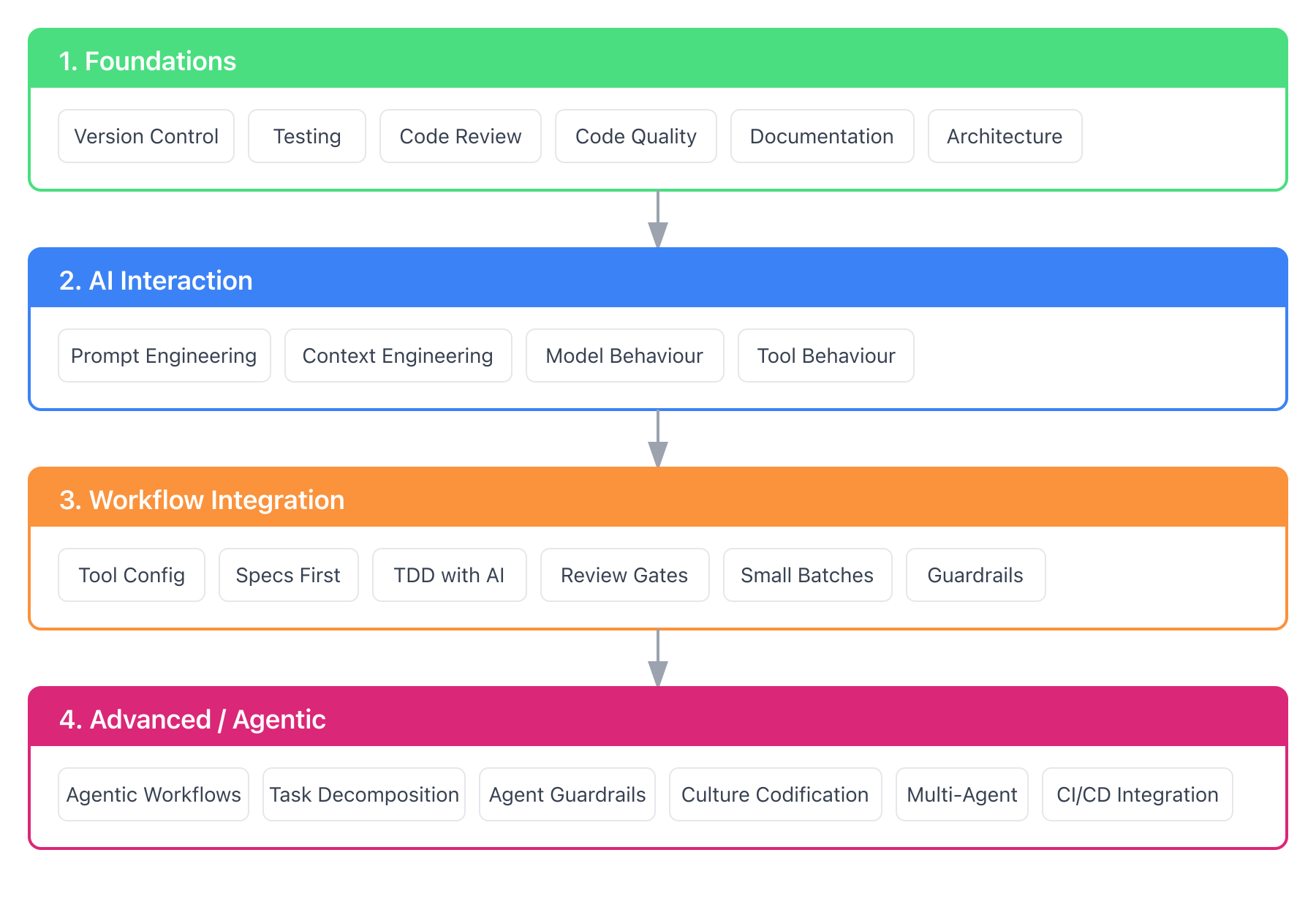
<p><a href="/assets/images/posts/2026-01-01-skill-map/skill-progression.png"><img src="/assets/images/posts/2026-01-01-skill-map/skill-progression.png" alt="Skill progression map showing four stages: Foundations, AI Interaction, Workflow Integration, and Advanced/Agentic" class="diagram-lg" /></a></p>

<p>Master the skills at each stage before moving to the next. Skipping ahead creates gaps that AI will expose.</p>

<h3 id="1-foundations">1. Foundations</h3>

<p>The <a href="https://dora.dev/research/2025/dora-report/">2025 DORA report</a> confirmed what many suspected: AI amplifies your existing capability, magnifying both strengths and weaknesses.</p>

<p>If your fundamentals are weak, AI won’t fix them. It will make the cracks more visible, faster.</p>

<p>This map assumes you already have solid computer science fundamentals: data structures, algorithms, and an understanding of how systems work (processors, memory, networking, databases, etc.). AI doesn’t replace the need to know these.</p>

<h4 id="version-control-fluency">Version control fluency</h4>

<p>Git workflows, meaningful commits, safe experimentation with branches. AI generates code quickly. If you can’t safely integrate and roll back changes, you’ll spend more time cleaning up than you save.</p>

<p><strong>How to build this:</strong></p>
<ul>
  <li>If you haven’t used branches and pull requests regularly, start a side project that forces you to</li>
  <li>Read <a href="https://git-scm.com/book/en/v2">Pro Git</a> (free online) - chapters 1-3 cover the essentials</li>
  <li>Learn <a href="https://git-scm.com/docs/git-worktree">git worktrees</a> - you’ll need them for multi-agent workflows in the Advanced section</li>
</ul>

<h4 id="testing-fundamentals">Testing fundamentals</h4>

<p>The <a href="https://martinfowler.com/articles/practical-test-pyramid.html">test pyramid</a> still applies. Unit, integration, end-to-end. AI can generate tests, but knowing which tests matter, when to push tests up or down the pyramid, and reviewing their quality is your job. Build intuition for what belongs at each layer.</p>

<p><strong>How to build this:</strong></p>
<ul>
  <li>Practice writing tests before code (TDD) on a small project</li>
  <li>Read <a href="https://www.oreilly.com/library/view/test-driven-development/0321146530/">Test-Driven Development: By Example</a> by Kent Beck, the foundational TDD book</li>
  <li>Read <a href="https://www.pearson.com/en-us/subject-catalog/p/growing-object-oriented-software-guided-by-tests/P200000009298/">Growing Object-Oriented Software, Guided by Tests</a> by Steve Freeman and Nat Pryce for TDD in practice</li>
  <li>Apply <a href="https://martinfowler.com/bliki/TestPyramid.html">Martin Fowler’s test pyramid rule</a>: if a unit test covers it, don’t duplicate at higher levels. Push tests down: unit test business logic, integration test service interactions, end-to-end only for critical user paths</li>
</ul>

<h4 id="code-review-discipline">Code review discipline</h4>

<p>You’ll review more code than ever. AI-generated code often looks plausible but handles edge cases incorrectly. Strengthen your eye for subtle bugs.</p>

<p><strong>What to watch for in AI-generated code:</strong></p>
<ul>
  <li><strong>Security vulnerabilities</strong>: SQL injection, unsafe data handling, hardcoded secrets. AI often generates patterns that work but aren’t secure.</li>
  <li><strong>Edge cases</strong>: Null handling, empty collections, boundary conditions. AI tends to handle the happy path well but miss edge cases.</li>
  <li><strong>Business logic errors</strong>: AI can’t understand your domain. Verify that the code does what the business actually needs, not just what the prompt described.</li>
  <li><strong>Architectural violations</strong>: Does the code respect your layer boundaries? Does it follow your ADRs? AI doesn’t know your architectural constraints unless you tell it.</li>
  <li><strong>Code smells</strong>: Duplicated logic, overly complex methods, inconsistent patterns. AI doesn’t always match your codebase conventions.</li>
  <li><strong>Hallucinated APIs</strong>: Functions or methods that look real but don’t exist. Always verify imports and dependencies.</li>
</ul>

<p><strong>How to build this:</strong></p>
<ul>
  <li>Review pull requests on open source projects you use</li>
  <li>Read <a href="https://google.github.io/eng-practices/review/">Code Review Guidelines</a> from Google’s engineering practices</li>
  <li>Practice the “trust but verify” mindset: assume AI code needs checking, not approval</li>
</ul>

<h4 id="code-quality-intuition">Code quality intuition</h4>

<p>Can you recognize maintainable, clean code vs technically-correct-but-messy? AI generates code fast. If you can’t tell good from bad, you’ll accept garbage that costs you later.</p>

<p><strong>How to build this:</strong></p>
<ul>
  <li>Read <a href="https://www.oreilly.com/library/view/clean-code-a/9780136083238/">Clean Code</a> by Robert Martin</li>
  <li>Refactor old code you wrote, or practice on <a href="https://github.com/emilybache/GildedRose-Refactoring-Kata">clean code katas</a> - notice what makes code hard to change</li>
</ul>

<h4 id="documentation-practices">Documentation practices</h4>

<p>Documentation becomes AI context. Quality documentation into the system means quality AI output. Poor docs mean the AI hallucinates or makes wrong assumptions.</p>

<p><strong>How to build this:</strong></p>
<ul>
  <li>Document a project you’re working on as if a new teammate needs to understand it</li>
  <li>Read <a href="https://docsfordevelopers.com/">Docs for Developers</a> for practical guidance</li>
</ul>

<h4 id="architecture-understanding">Architecture understanding</h4>

<p>Data flow, component boundaries, dependency management. AI tools need you to describe constraints clearly. If you don’t understand the architecture, you can’t provide good context.</p>

<p><strong>How to build this:</strong></p>
<ul>
  <li>Draw architecture diagrams for systems you work with</li>
  <li>Read <a href="https://www.oreilly.com/library/view/fundamentals-of-software/9781492043447/">Fundamentals of Software Architecture</a> by Richards and Ford for trade-offs and patterns</li>
  <li>Read <a href="https://dataintensive.net/">Designing Data-Intensive Applications</a> by Kleppmann for distributed systems and data architecture</li>
  <li>For microservices specifically, read <a href="https://www.oreilly.com/library/view/building-microservices-2nd/9781492034018/">Building Microservices</a> by Sam Newman</li>
</ul>

<hr />

<h3 id="2-ai-interaction">2. AI Interaction</h3>

<p>The skills specific to working with AI systems. You’re learning to communicate with a system that’s capable but context-limited, confident but sometimes wrong.</p>

<h4 id="prompt-engineering-basics">Prompt engineering basics</h4>

<p>Specificity matters. Vague requests get vague results.</p>

<p><strong>Bad prompt:</strong></p>
<div class="language-plaintext highlighter-rouge"><div class="highlight"><pre class="highlight"><code>Write a function to parse dates
</code></pre></div></div>

<p><strong>Good prompt:</strong></p>
<div class="language-plaintext highlighter-rouge"><div class="highlight"><pre class="highlight"><code>Write a Python function that:
- Parses ISO 8601 date strings (e.g., "2025-12-31T14:30:00Z")
- Handles timezone offsets
- Returns None for invalid input
- Include docstring and type hints
</code></pre></div></div>

<p>The difference isn’t cleverness - it’s precision.</p>

<p><strong>Key techniques:</strong></p>

<table>
  <thead>
    <tr>
      <th>Technique</th>
      <th>What It Is</th>
      <th>When to Use</th>
    </tr>
  </thead>
  <tbody>
    <tr>
      <td><strong>Specificity</strong></td>
      <td>Precise requirements over vague requests</td>
      <td>Always - the biggest lever</td>
    </tr>
    <tr>
      <td><strong>Few-shot prompting</strong></td>
      <td>Show 1-3 examples of input → output</td>
      <td>Team patterns, consistent formatting</td>
    </tr>
    <tr>
      <td><strong>Chain of thought</strong></td>
      <td>“Think step-by-step: analyze, identify, explain, then fix”</td>
      <td>Debugging, complex reasoning</td>
    </tr>
    <tr>
      <td><strong>Role prompting</strong></td>
      <td>“Act as a senior security engineer reviewing for vulnerabilities”</td>
      <td>When expertise framing helps</td>
    </tr>
    <tr>
      <td><strong>Meta prompting</strong></td>
      <td>Prompts that generate or refine other prompts</td>
      <td>Org-level standards, team templates</td>
    </tr>
    <tr>
      <td><strong>Explicit constraints</strong></td>
      <td>“Don’t use external libraries. Keep it under 50 lines.”</td>
      <td>Avoiding common failure modes</td>
    </tr>
  </tbody>
</table>

<p><strong>Few-shot example:</strong></p>

<div class="language-plaintext highlighter-rouge"><div class="highlight"><pre class="highlight"><code>Convert these function names from camelCase to snake_case:

Example 1: getUserById -&gt; get_user_by_id
Example 2: validateEmailAddress -&gt; validate_email_address

Now convert: fetchAllActiveUsers
</code></pre></div></div>

<p><strong>Chain of thought example:</strong></p>

<div class="language-plaintext highlighter-rouge"><div class="highlight"><pre class="highlight"><code>Debug this function. Think step-by-step:
1. What is this function supposed to do?
2. Trace through with input X - what happens at each line?
3. Where does the actual behavior differ from expected?
4. What's the fix?
</code></pre></div></div>

<p><strong>How to build this:</strong></p>
<ul>
  <li>Spend a week being deliberate about prompts. Write down what you asked, what you got, and what you wish you’d asked.</li>
  <li>Read <a href="https://platform.claude.com/docs/en/build-with-claude/prompt-engineering/overview">Anthropic’s Prompt Engineering Guide</a></li>
  <li>Reference <a href="https://www.promptingguide.ai/">promptingguide.ai</a> for comprehensive techniques</li>
</ul>

<h4 id="context-engineering">Context engineering</h4>

<p>A clever prompt won’t fix bad context. Context engineering is about curating what information the model sees: project constraints, coding standards, relevant examples, what you’ve already tried.</p>

<p>This is the 80% of the skill. Prompt engineering is maybe 20%.</p>

<p>I’ve written a detailed guide on this: <a href="https://karun.me/blog/2025/12/31/context-engineering-for-ai-assisted-development/">Context Engineering for AI-Assisted Development</a>.</p>

<p><strong>How to build this:</strong></p>
<ul>
  <li>Create a project-level context file (e.g., CLAUDE.md) for your current codebase</li>
  <li>Add coding standards, architectural constraints, common patterns</li>
  <li>Notice when AI output improves because of better context</li>
</ul>

<h4 id="understanding-model-behaviour">Understanding model behaviour</h4>

<p>You don’t need to become an ML engineer, but knowing the basics helps.</p>

<p><strong>What to understand:</strong></p>

<table>
  <thead>
    <tr>
      <th>Concept</th>
      <th>Why It Matters</th>
    </tr>
  </thead>
  <tbody>
    <tr>
      <td><strong>Context windows</strong></td>
      <td>Why your 50-file codebase overwhelms the model. Why it “forgets” earlier instructions. (<a href="https://docs.anthropic.com/en/docs/build-with-claude/context-windows">Anthropic’s context window docs</a>)</td>
    </tr>
    <tr>
      <td><strong>Training data &amp; fine-tuning</strong></td>
      <td>Why Claude excels at code review. Why some models are verbose, others concise.</td>
    </tr>
    <tr>
      <td><strong>Knowledge cutoff</strong></td>
      <td>Why the model doesn’t know about libraries released last month.</td>
    </tr>
    <tr>
      <td><strong>Hallucinations</strong></td>
      <td>Models confidently generate plausible-looking nonsense. Verify APIs exist. Test edge cases.</td>
    </tr>
    <tr>
      <td><strong>Cost per token</strong></td>
      <td>Why Opus is expensive for exploration but worth it for complex reasoning. (<a href="https://www.anthropic.com/pricing">Anthropic pricing</a>)</td>
    </tr>
  </tbody>
</table>

<p><strong>Model strengths (from my experience):</strong></p>

<table>
  <thead>
    <tr>
      <th>Model</th>
      <th>Strengths</th>
    </tr>
  </thead>
  <tbody>
    <tr>
      <td>Claude</td>
      <td>Thoughtful about edge cases, good at following complex instructions, strong code review</td>
    </tr>
    <tr>
      <td>GPT</td>
      <td>Fast, good at general tasks, wide knowledge</td>
    </tr>
    <tr>
      <td>Gemini</td>
      <td>Larger context windows, good at multimodal tasks</td>
    </tr>
  </tbody>
</table>

<p>These observations come from my own work. Models evolve quickly - what’s true today may change next quarter.</p>

<p><strong>How to build this:</strong></p>
<ul>
  <li>Try the same task with different models. Note where each excels.</li>
  <li>Read model release notes when new versions come out</li>
  <li>Track which models work best for your common tasks</li>
</ul>

<h4 id="understanding-tool-behaviour">Understanding tool behaviour</h4>

<p>Here’s something that trips people up: <strong>the same model behaves differently in different tools</strong>.</p>

<p>Cursor’s Claude is not the same as Claude Code’s Claude is not the same as Windsurf’s Claude. Why? Each tool wraps the model with its own system prompt.</p>

<table>
  <thead>
    <tr>
      <th>Aspect</th>
      <th>Model Nuances (Intrinsic)</th>
      <th>Tool Nuances (Extrinsic)</th>
    </tr>
  </thead>
  <tbody>
    <tr>
      <td><strong>What it is</strong></td>
      <td>Differences baked into the model itself</td>
      <td>Differences from how the tool wraps the model</td>
    </tr>
    <tr>
      <td><strong>Examples</strong></td>
      <td>Context window, reasoning style, training data, cost</td>
      <td>System prompts, UI, context injection, available commands</td>
    </tr>
    <tr>
      <td><strong>What to learn</strong></td>
      <td>Model strengths for different tasks</td>
      <td>How your tool injects context, what its system prompt optimizes for</td>
    </tr>
  </tbody>
</table>

<p>This means: instructions that work well in Claude Code might not work the same in Cursor, even with the same underlying model. The tool’s system prompt and context injection change the behavior.</p>

<p><strong>How to build this:</strong></p>
<ul>
  <li>Try the same prompt in multiple tools. Notice the differences.</li>
  <li>Read your tool’s documentation on how it manages context</li>
  <li>Understand what your tool’s system prompt optimizes for (coding, conversation, etc.)</li>
</ul>

<hr />

<h3 id="3-workflow-integration">3. Workflow Integration</h3>

<p>Making AI a standard part of how you build software, not a novelty you occasionally use.</p>

<h4 id="tool-configuration">Tool configuration</h4>

<p>Configure your AI tools for your team’s context. This isn’t a one-time setup. Rules files need tuning. Context evolves. Tools update frequently.</p>

<p>Each tool has its own configuration mechanism:</p>
<ul>
  <li>Claude Code uses <a href="https://code.claude.com/docs/en/memory">CLAUDE.md files</a></li>
  <li>Cursor uses <a href="https://cursor.directory">rules</a></li>
  <li>Windsurf uses <a href="https://docs.windsurf.com/windsurf/cascade/memories">memories</a></li>
</ul>

<p>Instructions that work in one tool won’t transfer directly to another because system prompts differ.</p>

<p><strong>How to build this:</strong></p>
<ul>
  <li>Document your configuration so teammates can get productive quickly</li>
  <li>Review and update configuration monthly as tools evolve</li>
</ul>

<h4 id="specs-before-implementation">Specs-before-implementation</h4>

<p>Define what to build before AI generates code. AI generates code that matches a spec well. It struggles to determine what the spec should be.</p>

<p>Write the spec first - acceptance criteria, edge cases, constraints. Then let AI implement.</p>

<p><strong>How to build this:</strong></p>
<ul>
  <li>Practice writing specs for features before touching code</li>
  <li>Include: what it should do, what it shouldn’t do, edge cases to handle</li>
</ul>

<h4 id="test-driven-mindset-with-ai">Test-driven mindset with AI</h4>

<p>Write tests first. Let AI implement to pass them. This flips the usual flow: instead of “generate code, then test it”, you “define the contract, then fill it in.”</p>

<p>The tests become your spec. When AI has an executable target (tests that must pass), it produces better code than when interpreting prose requirements.</p>

<p><strong>How to build this:</strong></p>
<ul>
  <li>Try TDD on a small feature: write failing tests, then ask AI to make them pass</li>
  <li>Review the generated code - does it just satisfy the tests or is it actually good?</li>
</ul>

<h4 id="human-review-gates">Human review gates</h4>

<p>AI-generated code requires the same (or stricter) review as human-written code. Build the habit of treating AI output like code from a confident junior developer: often correct, sometimes subtly wrong, occasionally completely off base.</p>

<p><strong>How to build this:</strong></p>
<ul>
  <li>Set a personal rule: no AI-generated code merged without reviewing every line</li>
  <li>Track your AI acceptance rate. If you’re accepting &gt;80% without modification, you might be over-trusting.</li>
</ul>

<h4 id="small-batches">Small batches</h4>

<p>Generate less, review more. A 1000-line AI diff is harder to review than a 100-line one. Work in small chunks. Commit often.</p>

<p><strong>How to build this:</strong></p>
<ul>
  <li>Break tasks into steps that produce &lt;200 lines of change</li>
  <li>Commit after each step passes review</li>
</ul>

<h4 id="quality-guardrails">Quality guardrails</h4>

<p>Integrate linting, static analysis, and security scanning into your workflow. These catch issues AI introduces. Shift left. Catch problems early.</p>

<p><strong>How to build this:</strong></p>
<ul>
  <li>Set up pre-commit hooks for linting and formatting</li>
  <li>Add security scanning to CI (e.g., <a href="https://snyk.io/">Snyk</a>, <a href="https://semgrep.dev/">Semgrep</a>)</li>
</ul>

<h4 id="living-documentation">Living documentation</h4>

<p>Documentation updated atomically with code changes. When code changes, docs change in the same commit. This keeps your AI context current.</p>

<p><strong>How to build this:</strong></p>
<ul>
  <li>Include doc updates in your definition of done</li>
  <li>Review PRs for documentation staleness</li>
</ul>

<hr />

<h3 id="4-advanced--agentic">4. Advanced / Agentic</h3>

<p>Skills for autonomous AI workflows. These are powerful but risky - more autonomy needs stronger guardrails.</p>

<h4 id="agentic-workflow-design">Agentic workflow design</h4>

<p>Tools like Claude Code, Cursor, and Windsurf can run shell commands, edit files, and chain actions. Know what your tool can do and design workflows that leverage it.</p>

<p><strong>How to build this:</strong></p>
<ul>
  <li>Start with supervised agents - review each step before allowing the next</li>
  <li>Read <a href="https://code.claude.com/docs/en/github-actions">Claude Code’s GitHub Actions integration</a> for CI/CD examples</li>
</ul>

<h4 id="task-decomposition">Task decomposition</h4>

<p>Break complex work into subtasks an agent can handle. Good decomposition is a skill in itself. Too big and the agent loses focus. Too small and you spend all your time orchestrating.</p>

<p><strong>How to build this:</strong></p>
<ul>
  <li>Practice breaking features into agent-sized tasks (~30 min of work each)</li>
  <li>Notice which decompositions lead to better agent output</li>
</ul>

<h4 id="guardrails-for-agents">Guardrails for agents</h4>

<p>More autonomy needs stronger guardrails. Sandboxing, approval gates, rollback procedures. Agents make mistakes. Build systems that catch them.</p>

<p><strong>How to build this:</strong></p>
<ul>
  <li>Never give agents write access to production</li>
  <li>Implement approval gates for destructive operations</li>
</ul>

<h4 id="engineering-culture-codification">Engineering culture codification</h4>

<p>Turn your team’s standards, patterns, and guidelines into structured artifacts that AI can use. This is how you scale intelligent Engineering beyond individuals.</p>

<p>When you document coding standards, architectural patterns, and review checklists in a format AI can consume, every team member (and AI tool) operates from the same playbook.</p>

<p><strong>How to build this:</strong></p>
<ul>
  <li>Start with a CLAUDE.md (or equivalent) that captures your team’s conventions</li>
  <li>Add architectural decision records (ADRs) that AI can reference</li>
</ul>

<h4 id="multi-agent-orchestration">Multi-agent orchestration</h4>

<p>Running parallel agents (e.g., using git worktrees). Coordinating results. This is emerging territory.</p>

<p><strong>How to build this:</strong></p>
<ul>
  <li>Try running two agents on independent tasks</li>
  <li>Notice coordination challenges and develop patterns for handling them</li>
</ul>

<h4 id="cicd-integration">CI/CD integration</h4>

<p>Running AI reviews on pull requests. Automated code analysis. Scheduled agents for maintenance tasks.</p>

<p><strong>How to build this:</strong></p>
<ul>
  <li>Set up <a href="https://docs.github.com/en/copilot/how-tos/agents/copilot-code-review/using-copilot-code-review">Copilot code review</a> or similar on your repo</li>
  <li>Start with comment-only (no auto-merge) until you trust it</li>
</ul>

<hr />

<h2 id="learning-paths">Learning Paths</h2>

<p>Not everyone starts from the same place.</p>

<h3 id="for-developers-new-to-ai-tools">For Developers New to AI Tools</h3>

<p><strong>Start here:</strong> <a href="#1-foundations">Foundations</a> + <a href="#2-ai-interaction">AI Interaction</a> basics</p>

<ol>
  <li>Get comfortable with one AI tool. GitHub Copilot is a good starting point for its low cost and tight editor integration. For open source alternatives, try <a href="https://aider.chat/">Aider</a> or <a href="https://github.com/sst/opencode">OpenCode</a>.</li>
  <li>Spend 2-4 weeks using it for completion and simple generation.</li>
  <li>Practice prompting: be specific, iterate, learn what works.</li>
  <li>Move to a more capable tool (Claude Code, Cursor, Windsurf) once you’re comfortable.</li>
  <li>Build your first context file.</li>
</ol>

<p><strong>Expected ramp-up:</strong> 4-8 weeks to feel productive.</p>

<h3 id="for-developers-experienced-with-ai">For Developers Experienced With AI</h3>

<p><strong>Start here:</strong> <a href="#3-workflow-integration">Workflow Integration</a> + <a href="#4-advanced--agentic">Advanced</a></p>

<ol>
  <li>Audit your current workflow. Where are you using AI effectively? Where are you over-trusting?</li>
  <li>Strengthen context engineering. Create comprehensive project context files.</li>
  <li>Set up guardrails: linting, security scanning, review checklists.</li>
  <li>Experiment with agentic workflows under supervision.</li>
  <li>Integrate AI into CI/CD.</li>
</ol>

<p><strong>Expected ramp-up:</strong> 2-4 weeks to significantly improve your workflow.</p>

<h3 id="for-tech-leaders-building-team-capability">For Tech Leaders Building Team Capability</h3>

<p>Whether you’re a Tech Lead, Engineering Manager, Principal Engineer, or anyone else responsible for growing your team’s capability, this section is for you.</p>

<p><strong>Start here:</strong> The <a href="https://cloud.google.com/resources/content/2025-dora-ai-capabilities-model-report">2025 DORA AI Capabilities Model</a></p>

<p>The report identified seven practices that amplify AI’s positive impact:</p>

<ol>
  <li><strong>Clear AI stance</strong>: Establish expectations for how your team uses AI.</li>
  <li><strong>Healthy data ecosystem</strong>: Quality documentation enables quality AI outputs.</li>
  <li><strong>Strong version control</strong>: Rollback capability provides a safety net for experimentation.</li>
  <li><strong>Small batches</strong>: Enable quick course corrections.</li>
  <li><strong>User-centric focus</strong>: Clear goals improve AI output quality.</li>
  <li><strong>Quality internal platforms</strong>: Standardised tooling scales AI benefits.</li>
  <li><strong>AI-accessible data</strong>: Make context available to AI tools.</li>
</ol>

<p><strong>Actions:</strong></p>
<ol>
  <li>Assess your team against these practices. Where are the gaps?</li>
  <li>Don’t change everything at once. Introduce AI at one delivery stage at a time.</li>
  <li>Expect a learning curve: 2-4 weeks of reduced productivity before gains appear.</li>
  <li>Invest in guardrails before acceleration.</li>
  <li>Measure impact with DORA metrics: deployment frequency, lead time, change failure rate, time to restore.</li>
</ol>

<hr />

<h2 id="common-pitfalls">Common Pitfalls</h2>

<p><strong>Starting with advanced tools</strong>: If you skip fundamentals, you’ll produce more code, faster, with worse quality. The problems compound.</p>

<p><strong>Ignoring context engineering</strong>: Most teams spend all their energy on prompt engineering. Context engineering matters far more. Good context makes mediocre prompts work; perfect prompts can’t fix missing context. And context scales: set it up once, benefit every interaction.</p>

<p><strong>Over-trusting AI</strong>: “The AI suggested it” is not an acceptable answer in a post-mortem. <a href="https://karun.me/blog/2025/11/06/intelligent-engineering-building-skills-and-shaping-principles/#ai-augments-humans-stay-accountable">You’re accountable for what ships</a>.</p>

<p><strong>Under-trusting AI</strong>: Some developers refuse to adopt AI tools, treating them as a passing fad. The productivity gap is real. Healthy skepticism is fine, but refusing to engage is risky. For tech leaders: <a href="https://dora.dev/ai/research-insights/adopt-gen-ai/">DORA’s research on AI adoption</a> shows that addressing anxieties directly and providing dedicated exploration time significantly improves adoption.</p>

<p><strong>No guardrails</strong>: AI makes it easy to move fast. Without automated quality checks, you’ll ship bugs faster too. <a href="https://karun.me/blog/2025/11/06/intelligent-engineering-building-skills-and-shaping-principles/#smarter-ai-needs-smarter-guardrails">Smarter AI needs smarter guardrails</a>. If you don’t have linting, security scanning, and CI checks, add them before increasing your AI usage. For legacy codebases without tests, start with <a href="https://understandlegacycode.com/blog/best-way-to-start-testing-untested-code/">characterization tests</a> to capture current behaviour before refactoring. Michael Feathers’ <a href="https://www.oreilly.com/library/view/working-effectively-with/0131177052/">Working Effectively with Legacy Code</a> is the definitive guide here. AI can accelerate this process, but verify every generated test passes against the real system without any changes to production code.</p>

<p><strong>Confusing model and tool behaviour</strong>: When AI output is wrong, is it the model’s limitation or the tool’s system prompt? Knowing the difference helps you fix it. To diagnose: try the same prompt in a different tool or the raw API. If the problem persists across tools, it’s likely a model limitation. If it only happens in one tool, check how that tool injects context.</p>

<p><strong>Trying to measure productivity improvement without baselines</strong>: You can’t prove AI made your team faster if you weren’t measuring before. Worse, once estimates become targets for measuring AI impact, <a href="https://www.linkedin.com/feed/update/urn:li:activity:7405299770233135105/">developers adjust their estimates</a> (consciously or not). Skip the productivity theatre. Instead, measure what matters: features shipped, customer value delivered, time from idea to production, team satisfaction.</p>

<hr />

<h2 id="whats-next">What’s Next</h2>

<p>This skill map is a snapshot. The tools evolve weekly. New capabilities emerge monthly.</p>

<p>If you’re on this journey, I’d like to hear what’s working for you. What skills have I missed? What resources have you found valuable?</p>

<p><strong>Coming up:</strong> Putting these skills into practice. I’ll walk through <a href="https://karun.me/blog/2026/01/02/intelligent-engineering-in-practice/">setting up intelligent Engineering on a real project</a>, covering tool configuration, context files, and workflow patterns that work.</p>]]></content><author><name>Karun Japhet</name></author><category term="intelligent Engineering" /><category term="ai-assisted-development" /><category term="coding-assistants" /><category term="career" /><summary type="html"><![CDATA[A practical map of AI-assisted development skills: what to learn first, how to progress, and common pitfalls to avoid.]]></summary><media:thumbnail xmlns:media="http://search.yahoo.com/mrss/" url="https://karun.me/assets/images/posts/2026-01-01-skill-map/skill-progression.png" /><media:content medium="image" url="https://karun.me/assets/images/posts/2026-01-01-skill-map/skill-progression.png" xmlns:media="http://search.yahoo.com/mrss/" /></entry><entry><title type="html">Context Engineering for AI-Assisted Development</title><link href="https://karun.me/blog/2025/12/31/context-engineering-for-ai-assisted-development/" rel="alternate" type="text/html" title="Context Engineering for AI-Assisted Development" /><published>2025-12-31T00:00:00+05:30</published><updated>2025-12-31T00:00:00+05:30</updated><id>https://karun.me/blog/2025/12/31/context-engineering-for-ai-assisted-development</id><content type="html" xml:base="https://karun.me/blog/2025/12/31/context-engineering-for-ai-assisted-development/"><![CDATA[<p>Same model, different tools, different results.</p>

<p>If you’ve used Claude Sonnet in <a href="https://claude.ai/code">Claude Code</a>, <a href="https://cursor.com">Cursor</a>, <a href="https://github.com/features/copilot">Copilot</a>, and <a href="https://windsurf.com">Windsurf</a>, you’ve noticed this. The model is identical, but the behavior varies. This isn’t magic. It’s context engineering.</p>

<!-- more -->

<p><a href="https://karun.me/assets/images/posts/2025-12-31-context-engineering/cover.jpg"><img src="https://karun.me/assets/images/posts/2025-12-31-context-engineering/cover.jpg" alt="Two people collaborating at a whiteboard with diagrams and notes" class="diagram-lg" /></a></p>

<p>In <a href="https://karun.me/blog/2025/11/06/intelligent-engineering-building-skills-and-shaping-principles/">intelligent Engineering: Principles for Building With AI</a>, I mentioned that “context is everything” and that “context engineering matters more than prompt engineering.” But I didn’t explain what that means or how to do it. This post fills that gap.</p>

<h2 id="the-whiteboard">The Whiteboard</h2>

<p>Imagine you’re in a day-long strategy meeting. There’s one whiteboard in the room. That’s all the shared space you have.</p>

<p>Your teammate is brilliant. They can see everything on the board and reason about it. But here’s the thing: they have no memory outside this whiteboard. What’s written is all they know. Erase something, and it’s gone.</p>

<p>Before the meeting started, someone wrote ground rules at the top: “Focus on Q1 priorities. Be specific. No tangents.” This section doesn’t get erased. It frames everything that follows. (That’s the system prompt.)</p>

<p>The meeting begins. You add notes, diagrams, decisions. The board fills up. You need to add something new, but there’s no space. What do you erase? The detailed debate from 9am, or the decision it produced? You keep the decision, erase the discussion. (That’s compaction.)</p>

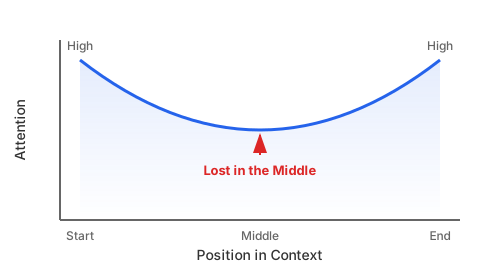
<p>Three hours in, you notice something odd. Your teammate keeps referencing the top and bottom of the board, but seems to miss what’s in the middle. Important context from 10:30am is right there, but they’re not looking at it. The middle of the board gets less attention.</p>

<p>Someone raises a topic that needs last quarter’s data. Do you copy the entire Q4 report onto the board? No. You flip open your notebook, find the one relevant chart, add it to the board, discuss it, then erase it when you move on. (That’s just-in-time retrieval.) The notebook stays on the table. You reference it when needed, but it doesn’t consume board space.</p>

<p>By afternoon, old notes are causing problems. A 9am assumption turned out to be wrong, but it’s still on the board. Your teammate keeps building on it. The board is poisoned with outdated information. You need to actively clean it up.</p>

<p>There’s too much on the board now. Some notes are written in shorthand. Others are cramped into corners with tiny handwriting. Your teammate can technically see it all, but finding anything takes effort. Attention is diluted. (That’s context distraction.)</p>

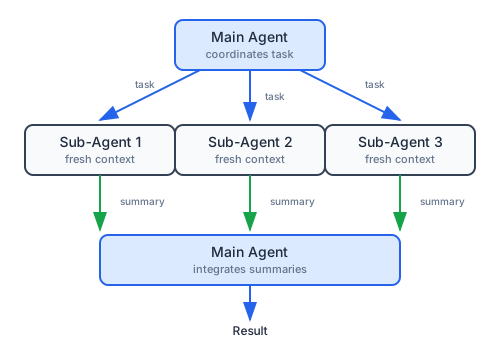
<p>For a complex sub-problem, you send two people to side rooms with fresh whiteboards. They work independently, then return with one-page summaries. You add the summaries to your board and integrate the findings. You never needed their full whiteboards. (That’s sub-agents.)</p>

<p>The whiteboard is your teammate’s entire context window. What’s on it is all they can work with. Your job is to curate what goes on the board so they can focus on what matters.</p>

<h2 id="what-this-means-technically">What This Means Technically</h2>

<p>The whiteboard story maps directly to how AI models process information.</p>

<h3 id="system-prompts-vs-user-prompts">System Prompts vs User Prompts</h3>

<p>The ground rules at the top of the board are the <strong>system prompt</strong>. You didn’t write them. They were there when you walked in, set by whoever built the tool. They define how the model behaves, what it prioritizes, what it can do.</p>

<p>What you add during the meeting is the <strong>user prompt</strong>. Your requests, your context, your questions. It works within the frame the system prompt establishes.</p>

<p>The model sees both. But system prompts carry more weight because they come first and set expectations.</p>

<h3 id="the-context-window">The Context Window</h3>

<p>The whiteboard’s physical dimensions are the <strong>context window</strong>. There’s a fixed amount of space. Everything competes for it: system instructions, conversation history, files you’ve pulled in, tool definitions, and the model’s own output. When it fills up, something has to go.</p>

<h3 id="lost-in-the-middle">Lost in the Middle</h3>

<p>Remember how your teammate focused on the top and bottom of the board but missed the middle? That’s a real phenomenon. Research shows a U-shaped attention curve: information at the start and end of context gets more attention than information in the middle.</p>

<p><a href="/assets/images/posts/2025-12-31-context-engineering/attention-curve.svg"><img src="/assets/images/posts/2025-12-31-context-engineering/attention-curve.svg" alt="U-shaped attention curve showing high attention at start and end of context, with 'Lost in the Middle' highlighting the attention dip" class="diagram-sm" /></a></p>

<p>This means:</p>
<ul>
  <li>Cramming everything into context can hurt performance</li>
  <li>Position matters: put important information first or last</li>
  <li>As context grows, accuracy often decreases</li>
</ul>

<p>In <a href="https://karun.me/blog/2025/07/07/patterns-for-ai-assisted-software-development/">Patterns for AI-assisted Software Development</a>, I described LLMs as “teammates with anterograde amnesia.” They can hold information, but only within the context window. Understanding how to manage that window is key.</p>

<h3 id="the-attention-budget">The Attention Budget</h3>

<p>Even with everything visible on the board, your teammate can only actively focus on so much while reasoning. Each item costs attention. Add more, and something else gets less focus. Think of it as a budget: every token you add depletes some of the model’s capacity to focus on what matters.</p>

<h2 id="how-different-tools-set-up-the-room">How Different Tools Set Up the Room</h2>

<p>Here’s why the same model behaves differently across tools: different rooms have different ground rules at the top of the board.</p>

<p>Take Claude Sonnet 4.5. Same teammate. But put them in different rooms:</p>

<table>
  <thead>
    <tr>
      <th>Room (Tool)</th>
      <th>Top of the board says</th>
    </tr>
  </thead>
  <tbody>
    <tr>
      <td>Claude Code</td>
      <td>“Work autonomously. Read files, run terminal commands, complete multi-step tasks.”</td>
    </tr>
    <tr>
      <td>Cursor</td>
      <td>“Stay in the editor. Complete code inline, understand the open file, suggest edits.”</td>
    </tr>
    <tr>
      <td>Copilot</td>
      <td>“Autocomplete as they type. Quick suggestions, stay out of the way.”</td>
    </tr>
    <tr>
      <td>Windsurf</td>
      <td>“Maintain flow. Remember preferences across sessions, keep continuity.”</td>
    </tr>
  </tbody>
</table>

<p>Your teammate reads the top of the board and behaves accordingly. That’s why the same model feels different in each tool. The system prompt shapes everything.</p>

<p>This also explains why prompts don’t transfer directly between tools. A prompt that works well in Claude Code might fail in Cursor because the framing is different.</p>

<h2 id="what-goes-wrong">What Goes Wrong</h2>

<p>When context fails, it fails in predictable ways. Recognizing these patterns helps you diagnose problems.</p>

<h3 id="context-poisoning">Context Poisoning</h3>

<p>Early errors compound. Your teammate builds on incorrect assumptions, reinforcing mistakes with each exchange. By the time you notice, the board is thoroughly polluted with wrong information.</p>

<p><strong>Fix:</strong> Use backtrack to undo recent turns. <a href="https://code.claude.com/docs/en/checkpointing">Claude Code</a>, <a href="https://cursor.com/docs/agent/chat/checkpoints">Cursor</a>, and <a href="https://docs.windsurf.com/windsurf/cascade/cascade#named-checkpoints-and-reverts">Windsurf</a> all support this. If the pollution runs deeper, compact to summarize past the bad section. Clear is the nuclear option when context is unsalvageable.</p>

<h3 id="context-distraction">Context Distraction</h3>

<p>Too much information competes for attention. The model can technically process it all, but signal gets lost in noise.</p>

<p>On the whiteboard: shorthand, tiny writing, notes crammed into corners. Your teammate can see it all, but finding anything takes effort.</p>

<p><strong>Fix:</strong> Keep context lean. Compact proactively. Don’t dump everything onto the board.</p>

<h3 id="context-confusion">Context Confusion</h3>

<p>Mixed content types muddle the model’s understanding. Code snippets, prose explanations, JSON configs, and error logs all blur together. The model can’t distinguish what’s an instruction versus an example versus context.</p>

<p>On the whiteboard: sticky notes, diagrams, tables, arrows, different colored markers. Your teammate can’t parse what type of information to use for what purpose.</p>

<p><strong>Fix:</strong> Use focused tools. Don’t overload the board with too many formats or capabilities.</p>

<h3 id="context-clash">Context Clash</h3>

<p>Contradictory instructions coexist. “Prioritize speed” in one corner. “Prioritize quality” in another. Your teammate sees both, doesn’t know which to follow, and produces something incoherent.</p>

<p><strong>Fix:</strong> Keep instructions centralized and current. Review your context files periodically for contradictions.</p>

<h2 id="managing-context-well">Managing Context Well</h2>

<p>Five techniques make a difference.</p>

<h3 id="just-in-time-retrieval">Just-in-Time Retrieval</h3>

<p>Don’t paste your whole codebase onto the board. Reference specific files and let the tool search.</p>

<p>Bad: “Here’s my entire src/ directory. Now fix the bug.”
Good: “There’s a bug in the date parser. Check src/utils/dates.ts.”</p>

<p>The notebook stays on the table. You flip it open when needed, find the relevant page, add it to the discussion, then move on.</p>

<h3 id="compaction">Compaction</h3>

<p>Context fills up during long sessions. Compaction summarizes conversation history, preserving key decisions while discarding noise.</p>

<p><strong>When to compact:</strong></p>
<ul>
  <li>After completing a major task (before starting the next one)</li>
  <li>During long sessions when you notice drift</li>
  <li>Before context hits limits (proactively, not reactively)</li>
</ul>

<p>You can provide custom instructions when compacting: “focus on architectural decisions” or “preserve the error messages we encountered.” This guides what gets kept versus summarized away.</p>

<p>My preference hierarchy:</p>
<ol>
  <li><strong>Small tasks with <code class="language-plaintext highlighter-rouge">/clear</code></strong> - fresh context beats compressed context</li>
  <li><strong>Early compaction with custom instructions</strong> - you control what matters</li>
  <li><strong>Early compaction with default prompt</strong> - still gives thinking room</li>
  <li><strong>Late compaction</strong> - avoid this</li>
</ol>

<p>Late compaction (waiting until 95% capacity) is the worst option. The model has no thinking room, and the automatic summarization is opaque. You lose nuance without knowing what disappeared. Early compaction, ideally with custom instructions, gives you control and leaves space for the model to reason. Steve Kinney’s <a href="https://stevekinney.com/courses/ai-development/claude-code-compaction">guide to Claude Code compaction</a> covers the mechanics well.</p>

<h3 id="structured-note-taking">Structured Note-Taking</h3>

<p>For complex, multi-hour work, maintain notes outside the conversation:</p>

<ul>
  <li>A NOTES.md file tracking progress</li>
  <li>Decision logs capturing why you chose specific approaches</li>
  <li>TODO lists that persist across compactions</li>
</ul>

<p>The model can reference these files when needed, but they’re not consuming context constantly. The notebook on the table, not copied onto the board.</p>

<h3 id="sub-agents">Sub-Agents</h3>

<p>For large tasks, send people to side rooms with fresh whiteboards:</p>

<ul>
  <li>Main agent coordinates the overall task</li>
  <li>Sub-agents handle specific, focused work with clean context</li>
  <li>Sub-agents return condensed summaries</li>
  <li>Main agent integrates results without carrying full sub-task context</li>
</ul>

<p><a href="/assets/images/posts/2025-12-31-context-engineering/sub-agents.svg"><img src="/assets/images/posts/2025-12-31-context-engineering/sub-agents.svg" alt="Sub-agent workflow: main agent delegates tasks to sub-agents with fresh context, receives summaries back, and integrates results" class="diagram-md" /></a></p>

<p>This mirrors how teams work: delegate, get summaries, integrate. Claude Code supports this pattern for <a href="https://www.geeky-gadgets.com/how-to-use-git-worktrees-with-claude-code-for-seamless-multitasking/">parallel issue work</a> using git worktrees.</p>

<h3 id="tool-specific-tips">Tool-Specific Tips</h3>

<p>Each tool has different mechanisms for managing what goes on the board.</p>

<p><strong>Claude Code:</strong></p>
<ul>
  <li>CLAUDE.md files load automatically at session start. Keep them focused and current.</li>
  <li>Hierarchical loading: user-level, project-level, directory-level. More specific overrides more general.</li>
  <li>Trust the tool’s search. Don’t paste file contents manually unless retrieval fails.</li>
  <li>Use <code class="language-plaintext highlighter-rouge">/compact</code> between logical units of work.</li>
</ul>

<p><strong>Cursor:</strong></p>
<ul>
  <li>Rules files inject instructions with different scopes: global, project, file-type specific.</li>
  <li>Use @-mentions deliberately. More files isn’t better; relevant files are better.</li>
  <li>Keep rule files short. They add to every interaction.</li>
</ul>

<p><strong>Copilot:</strong></p>
<ul>
  <li>Lighter touch. Works best for autocomplete and quick suggestions.</li>
  <li>Less configurable context, so prompt quality matters more.</li>
</ul>

<p><strong>Windsurf:</strong></p>
<ul>
  <li>Memories persist across sessions automatically.</li>
  <li>Good for maintaining preferences and patterns over time.</li>
</ul>

<p><strong>Aider, Cline, and similar terminal-based tools</strong> follow the same principles. Different mechanisms, same underlying constraints. For a deeper comparison, see <a href="https://karun.me/blog/2025/07/17/how-to-choose-your-coding-assistants/">How to choose your coding assistants</a>.</p>

<h2 id="the-core-principle">The Core Principle</h2>

<p>Anthropic’s engineering team puts it well in their <a href="https://www.anthropic.com/engineering/effective-context-engineering-for-ai-agents">guide to context engineering</a>:</p>

<blockquote>
  <p>Find the smallest set of high-signal tokens that maximize the likelihood of your desired outcome.</p>
</blockquote>

<p>More context isn’t better. Relevant context is better. Your job is to curate what goes on the board so your teammate can focus on what matters.</p>

<p>Context drives quality. But “quality context” doesn’t mean volume. It means signal: information the model needs to reason correctly. Everything else dilutes attention.</p>

<h2 id="whats-next">What’s Next</h2>

<p>Context engineering is a skill that develops with practice. Start by noticing when your tools perform well and when they drift. Ask why. Usually, the answer is in the context.</p>

<p>Take a few minutes to examine how your tool handles context. Where do instructions go? How do files get included? What happens during long sessions?</p>

<p>Understanding this is the difference between fighting your tools and working with them.</p>

<p><strong>Coming up:</strong> Context engineering is one piece of the puzzle. In <a href="https://karun.me/blog/2026/01/01/intelligent-engineering-a-skill-map-for-learning-ai-assisted-development/">intelligent Engineering: A Skill Map for Learning AI-Assisted Development</a>, I map out the full landscape of skills worth building.</p>]]></content><author><name>Karun Japhet</name></author><category term="intelligent Engineering" /><category term="ai-assisted-development" /><category term="ai-patterns" /><category term="coding-assistants" /><summary type="html"><![CDATA[A practical guide to context engineering: understand system prompts, manage context windows, and get better results from AI coding assistants.]]></summary><media:thumbnail xmlns:media="http://search.yahoo.com/mrss/" url="https://karun.me/assets/images/posts/2025-12-31-context-engineering/cover.jpg" /><media:content medium="image" url="https://karun.me/assets/images/posts/2025-12-31-context-engineering/cover.jpg" xmlns:media="http://search.yahoo.com/mrss/" /></entry><entry><title type="html">intelligent Engineering: Principles for Building With AI</title><link href="https://karun.me/blog/2025/11/06/intelligent-engineering-building-skills-and-shaping-principles/" rel="alternate" type="text/html" title="intelligent Engineering: Principles for Building With AI" /><published>2025-11-06T00:00:00+05:30</published><updated>2025-11-06T00:00:00+05:30</updated><id>https://karun.me/blog/2025/11/06/intelligent-engineering-building-skills-and-shaping-principles</id><content type="html" xml:base="https://karun.me/blog/2025/11/06/intelligent-engineering-building-skills-and-shaping-principles/"><![CDATA[<p>Software engineering is changing. Again.</p>

<p>I’ve spent the last two years applying AI across prototyping, internal tools, production systems, and team workflows. I’ve watched it produce an elegant solution in seconds, then confidently generate code calling APIs that don’t exist. I’ve seen it save hours on boilerplate and cost hours debugging hallucinated dependencies.</p>

<p>One thing has become clear: AI doesn’t make engineering easier. It shifts where the hard parts are.</p>

<!-- more -->

<p><a href="https://karun.me/assets/images/posts/2025-11-06-intelligent-engineering-building-skills-and-shaping-principles/cover.jpg"><img src="https://karun.me/assets/images/posts/2025-11-06-intelligent-engineering-building-skills-and-shaping-principles/cover.jpg" alt="AI and human collaboration in software engineering" class="diagram-lg" /></a></p>

<p>The teams I’ve seen succeed with AI aren’t the ones using it everywhere. They’re the ones using it deliberately, knowing when to trust it, when to verify, and when to ignore it entirely.</p>

<p>Here’s a working set of principles I’ve found useful. They aren’t finished and will evolve with the tools. But they help keep me grounded in what actually matters.</p>

<h2 id="intelligent-engineering-principles">intelligent Engineering Principles</h2>

<p>These principles fall into two buckets: what is new, and what remains timeless but more important than ever.</p>

<h3 id="ai-native-principles">AI-Native Principles</h3>

<p>These principles exist because of AI. They address challenges that didn’t matter before.</p>

<h4 id="ai-augments-humans-stay-accountable">AI augments, humans stay accountable.</h4>
<p>AI can help you move faster and see options you’d miss on your own. But it can’t own the outcome. Engineering judgment stays with you. When something breaks in production, “the AI suggested it” isn’t an acceptable answer.</p>

<h4 id="context-is-everything">Context is everything.</h4>
<p>AI output reflects what you put in. Vague requests get vague results. Bring useful context: project constraints, coding standards, relevant examples, what you’ve already tried.</p>

<p>As systems grow, context management becomes a discipline of its own. How do new teammates get AI tools primed with the right information? How do you keep that context current? When context exceeds what fits in a prompt, you’ll need solutions like modular documentation.</p>

<h4 id="smarter-ai-needs-smarter-guardrails">Smarter AI needs smarter guardrails.</h4>
<p>Faster generation demands sharper review. AI-produced code still needs validation: Is it correct? Secure? Does it solve the right problem?</p>

<h4 id="shape-ai-deliberately">Shape AI deliberately.</h4>
<p>I’ve seen teams adopt whatever AI tools are trending without asking whether they fit. Six months later, half the codebase assumed Copilot’s import ordering, onboarding docs referenced prompts that no longer worked, and no one remembered why. Decide upfront: where does AI help us? Where does it not? What happens when we switch tools?</p>

<h4 id="learning-never-stops">Learning never stops.</h4>
<p>At the start of 2025, AI practices evolved weekly. By year’s end, monthly. That’s still faster than most teams are used to. What didn’t work three months ago might work now. The only way to know is to keep experimenting.</p>

<p>I’ve settled on 90% getting work done, 10% experimenting. Try new ways to solve the same problem. Revisit old problems to see if there’s a simpler solution now. Check if techniques you learned last quarter still make sense.</p>

<h3 id="timeless-foundations">Timeless Foundations</h3>

<p>These aren’t new, but AI makes them more important.</p>

<h4 id="learn-fast-adapt-continuously">Learn fast, adapt continuously.</h4>
<p>Start small, validate often, and shorten feedback loops. If an AI-assisted workflow isn’t helping, change it. Don’t let sunk cost keep you on a bad path.</p>

<h4 id="fast-doesnt-mean-good">Fast doesn’t mean good.</h4>
<p>AI makes it easy to generate code fast. That doesn’t mean the code is worth keeping. Unmaintainable, insecure, or rigid solutions cost more than they save. Build the right thing, not just the quick thing.</p>

<h2 id="what-this-looks-like-in-practice">What This Looks Like in Practice</h2>

<p>Here’s what this means day-to-day:</p>

<ul>
  <li>I use AI to draft implementations, then spend more time reviewing than I saved generating. The review is where the real work happens.</li>
  <li>When AI suggests an approach, I ask “why?” If I can’t explain the choice to a teammate, I don’t use it.</li>
  <li>I’ve learned to be specific. “Write a function to parse dates” gets garbage. “Write unit tests for an ISO 8601 date parser, including edge cases for timezone offsets, leap seconds, and malformed input—then implement a function that passes them” gets something I can actually trust.</li>
  <li>I treat AI output like code from a confident junior developer: often correct, sometimes subtly wrong, occasionally completely off base.</li>
</ul>

<p>The craft hasn’t changed. I still need to understand the problem, reason about edge cases, and take responsibility for what ships.</p>

<h2 id="skills-worth-building">Skills Worth Building</h2>

<p>Principles guide decisions. Skills make them possible.</p>

<p>Here’s what I’ve found worth investing in:</p>

<p><strong>Context engineering matters more than prompt engineering.</strong> A clever prompt won’t fix bad context. I spend more time curating what information the model sees than crafting how I ask for things. Project documentation, coding standards, relevant examples. These matter more than prompt tricks.</p>

<p><strong>Understanding tokens and context windows helps.</strong> You don’t need to become an ML engineer. But it helps to know why your 50-file codebase overwhelms the model, or why it “forgets” earlier instructions.</p>

<p><strong>Agentic workflow primitives matter more than AI theory.</strong> You won’t build RAG systems from scratch. You’ll use tools with these built in. What matters is configuring them: hooks that customize behavior, skills that extend capabilities, context management that keeps information relevant. I spend more time learning how my tools’ hooks work or how to structure context files than reading ML papers.</p>

<p><em>For a comprehensive guide to building these skills, see <a href="https://karun.me/blog/2026/01/01/intelligent-engineering-a-skill-map-for-learning-ai-assisted-development/">A Skill Map for Learning AI-Assisted Development</a>.</em></p>

<h2 id="why-this-matters">Why This Matters</h2>

<p>I’ve seen what happens when teams adopt AI without thinking it through. Prototypes that demo well but collapse under real load. Codebases where no one understands why decisions were made because “the AI suggested it.” Bugs that take days to track down because the generated code looked plausible but handled edge cases incorrectly.</p>

<p>The failure mode isn’t dramatic. It’s slow erosion: teams that gradually stop reasoning deeply because the model provides answers quickly.</p>

<p>The alternative isn’t avoiding AI. It’s using it with intention. The engineers I’ve seen do this well have gotten faster <em>and</em> more thoughtful. They use AI to handle the routine and focus on the hard problems.</p>

<h2 id="whats-next">What’s Next</h2>

<p>These principles aren’t final. I expect to revise them as tools improve and as I learn what actually works versus what sounds good in theory.</p>

<p>If you’re experimenting with AI in your engineering work, I’d be curious to hear what’s working for you. What would you add? What would you challenge?</p>

<h2 id="credits">Credits</h2>

<p><em>This blog would not have been possible without the review and feedback from</em> <a href="https://www.linkedin.com/in/greg-reiser-6910462/"><em>Greg Reiser</em></a><em>,</em> <a href="https://www.linkedin.com/in/gsong/"><em>George Song</em></a> <em>and</em> <a href="https://www.linkedin.com/in/karthika-vijayan/"><em>Karthika Vijayan</em></a> <em>for reviewing multiple versions of this post and providing patient feedback 😀.</em></p>

<p><em>This content has been written on the shoulders of giants (at and outside</em> <a href="https://sahaj.ai"><em>Sahaj</em></a><em>).</em></p>]]></content><author><name>Karun Japhet</name></author><category term="intelligent Engineering" /><category term="ai-assisted-development" /><category term="engineering-principles" /><category term="ai-patterns" /><summary type="html"><![CDATA[Key principles for building software with AI: accountability, context engineering, guardrails, and timeless foundations for disciplined engineering teams.]]></summary><media:thumbnail xmlns:media="http://search.yahoo.com/mrss/" url="https://karun.me/assets/images/posts/2025-11-06-intelligent-engineering-building-skills-and-shaping-principles/cover.jpg" /><media:content medium="image" url="https://karun.me/assets/images/posts/2025-11-06-intelligent-engineering-building-skills-and-shaping-principles/cover.jpg" xmlns:media="http://search.yahoo.com/mrss/" /></entry><entry><title type="html">Level Up Code Quality with an AI Assistant</title><link href="https://karun.me/blog/2025/07/29/level-up-code-quality-with-an-ai-assistant/" rel="alternate" type="text/html" title="Level Up Code Quality with an AI Assistant" /><published>2025-07-29T00:00:00+05:30</published><updated>2025-07-29T00:00:00+05:30</updated><id>https://karun.me/blog/2025/07/29/level-up-code-quality-with-an-ai-assistant</id><content type="html" xml:base="https://karun.me/blog/2025/07/29/level-up-code-quality-with-an-ai-assistant/"><![CDATA[<p>Using AI coding assistants to introduce, automate, and evolve quality checks in your project.</p>

<p><a href="https://karun.me/assets/images/posts/2025-07-29-level-up-code-quality-with-an-ai-assistant/code-quality-with-ai-cover-art.png"><img src="https://karun.me/assets/images/posts/2025-07-29-level-up-code-quality-with-an-ai-assistant/code-quality-with-ai-cover-art-650x433.png" alt="Chosing Coding Assistants Cover Art: Choose your tool" /></a></p>

<p>I have talked about teams needing to have a <a href="https://karun.me/blog/2025/06/23/what-makes-developer-experience-world-class/">world class developer experience</a> as a pre-requisite for a well functioning team. When teams lack such a setup, the most common response is a lack of time or buy in from stakeholders to build these things. With <a href="https://karun.me/blog/2025/07/17/how-to-choose-your-coding-assistants/">AI coding assistants being readily available to most developers today</a>, the engineering effort and the cost investment for the business lesser reducing the barrier to entry.</p>

<!-- more -->

<h1 id="current-state">Current State</h1>

<p>This post showcases an actual codebase that has not been actively maintained for over 5 years but runs a product that is actively used. It is business critical but did not have the necessary safety nets in place. Let us go through the journey, prompts inclusive, on how to make the code quality of this repository better, one prompt at a time.</p>

<p>The project is a Django backend application that exposes APIs. We start off with a quick overview of the code and notice that there are tests and some documentation but a lack of consistent way to run and test the application.</p>

<h1 id="the-journey">The Journey</h1>

<p>I am assuming you are running these commands using Claude Code (with Claude Sonnet 4 in most cases). This is equally applicable across any coding assistant. Results will vary based on your choices of models, prompts and the codebase.</p>

<h2 id="setting-up-basic-documentation-and-some-automation">Setting up Basic Documentation and Some Automation</h2>

<p>If you are using a tool like Claude Code, run <code class="language-plaintext highlighter-rouge">/init</code> in your repository and you will get a significant part of this documentation.</p>

<div class="language-plaintext highlighter-rouge"><div class="highlight"><pre class="highlight"><code>Can you analyse the code and write up documentation in README.md that
 clearly summarises how to setup, run, test and lint the application.
Please make sure the file is concise and does not repeat itself. 
Write it like technical documentation. Short and sweet.
</code></pre></div></div>

<p>Next step is to start setting up some automation (like just files) to help make the project easier to use. This will take a couple of attempts to get right but here is a prompt you can start off with</p>

<div class="language-plaintext highlighter-rouge"><div class="highlight"><pre class="highlight"><code>Please write up a just file. I would like the following commands
`just setup` - set up all the dependencies of the project
`just run` - start up the applications including any dependencies
`just test` - run all tests
If you require clarifications, please ask questions. 
Think hard about what other requirements I need to fulfill. 
Be critical and question everything. 
Do not make code changes till you are clear on what needs to be done.
</code></pre></div></div>

<p>This will give you a base structure for you to modify quickly and get up and running. If you <code class="language-plaintext highlighter-rouge">README.md</code> has a preferred way to run the application (locally vs docker), the just will automatically use it. If not, you will have to provide clarification.</p>

<h2 id="setting-up-pre-commit-for-early-feedback">Setting up pre-commit for Early Feedback</h2>

<p>Let’s start small and build on it.</p>

<div class="language-plaintext highlighter-rouge"><div class="highlight"><pre class="highlight"><code>Please setup pre-commit with a single task to run all tests on every push.
Update the just script to ensure pre-commit hooks are installed locally
 during the setup process.
</code></pre></div></div>

<p>We probably didn’t need to be this explicit but I find managing context and keeping tasks small mean I move a lot quicker.</p>

<h2 id="curating-code-quality-tools">Curating Code Quality Tools</h2>

<p>Lets begin by finding good tools to use, create a plan for the change and then execute the plan. Start off by moving Claude Code to <code class="language-plaintext highlighter-rouge">Plan mode</code> (shift+tab twice)</p>

<div class="language-plaintext highlighter-rouge"><div class="highlight"><pre class="highlight"><code>What's a good tool to check the complexity of the python code this
 repository has and lint on it to provide the team feedback as a 
 pre-commit hook?
</code></pre></div></div>

<p>It came back with a set of tools I liked but it assumed that the commit will immediately go green. In an existing large codebase with tech debt, this will not happen. Let’s break this down further.</p>

<div class="language-plaintext highlighter-rouge"><div class="highlight"><pre class="highlight"><code>The list of tools you're suggesting sound good. 
The codebase currently will have a very large number of violations. 
I want the ability to incrementally improve things with every commit. 
How do we achieve this?
</code></pre></div></div>

<h2 id="creating-a-plan">Creating a Plan</h2>

<p>After you iterate on the previous prompt with the agent, you will get a plan that you’ll be happy with. The AI assistant will ask for permission to move forward and execute the plan but before doing so, it will be worth creating a save state. Imagine this as a video game save, if something goes wrong, come back and restore from this point. This also allows you to clear context since everything is dumped to markdown files on disk.</p>

<div class="language-plaintext highlighter-rouge"><div class="highlight"><pre class="highlight"><code>Can you create a plan that is executable in steps?
Write that plan to `docs/code-quality-improvements`.
Try to use multiple background agents if it helps speed up this process.
</code></pre></div></div>

<p>Give it a few minutes to analyse the code. In my case, the following files were created. <code class="language-plaintext highlighter-rouge">README.md</code> says that “Tasks within the same phase can be executed in parallel by multiple Claude Code assistants, as long as prerequisites are met”. You are ready to hit <code class="language-plaintext highlighter-rouge">/clear</code> and clear out the context window.</p>

<p><img src="https://karun.me/assets/images/posts/2025-07-29-level-up-code-quality-with-an-ai-assistant/code-quality-with-ai-tasks.jpg" alt="Plan as tasks" /></p>

<p>Phase 1 sets up the basic tools, phase 2 configures them, phase 3 focuses on integration and automation and phase 4 adds monitoring and focuses on improving the code quality.</p>

<p>Before executing the plan, I commit the plan (<code class="language-plaintext highlighter-rouge">docs/code-quality-improvement</code>). This allows me to track any changes that have been made. When executing the plan, I do not check in the changes made to the plan. This allows me to drop the plan at the end of the process. As a team, we have discussed potentially keeping the plan around as an artifact. To do so, you would have to ask Claude Code to use relative paths (it uses absolute paths when asking for files to be updated in the plan).</p>

<h2 id="executing-the-plan">Executing the Plan</h2>

<div class="language-plaintext highlighter-rouge"><div class="highlight"><pre class="highlight"><code>I would like to improve code quality and I have come up with a plan to do 
so under `docs/code-quality-improvement`.
Can you analyse the plan and start executing it? The `README.md` has a 
quick start section which tasks about how to execute different phases of the 
plan. As you execute the plan, mark tasks as done to track state.
</code></pre></div></div>

<p>You will notice that Claude Code will add dependencies to <code class="language-plaintext highlighter-rouge">requirements-dev.txt</code> and try to run things without installing them. Also, it will add dependencies that do not exist. Stop the execution (by pressing <code class="language-plaintext highlighter-rouge">Esc</code> ) and use the following prompt to course correct</p>

<div class="language-plaintext highlighter-rouge"><div class="highlight"><pre class="highlight"><code>For every pip dependency you add to `requirements-dev.txt`, please run 
`pip install`. 
Before adding a dependency to the dependency file, please check if it is 
available on `pip`.
</code></pre></div></div>

<p>Once phase 1 and phase 2 of the plan are complete, the following files are created and ready to be committed.</p>

<p><img src="https://karun.me/assets/images/posts/2025-07-29-level-up-code-quality-with-an-ai-assistant/code-quality-with-ai-linting-tools.jpg" alt="Linting tools setup" /></p>

<p>When the quality gates are added on phase 3, run the command once to test if everything works and create another commit. After this, I had to prompt it once more to integrate the lint steps into a simplified developer experience.</p>

<div class="language-plaintext highlighter-rouge"><div class="highlight"><pre class="highlight"><code>Please add `just lint` as a command to run all quality checks
</code></pre></div></div>

<p>Test the brand new lint command and then run a commit. Ask claude code to proceed to phase 4.</p>

<p><img src="https://karun.me/assets/images/posts/2025-07-29-level-up-code-quality-with-an-ai-assistant/code-quality-with-ai-claude-code-self-doubt.jpg" alt="Claude Code’s self doubt" /></p>

<p>You might see Claude Code doubt a plan that it has created. It is a good question because the system is <em>functional</em> but if we prefer the more advanced checks, we should request it pushes on with Phase 4 implementation.</p>

<p>After phase 4, we have a codebase that checks for code quality every time a developer is pushing code. Our repository has pre-commit hooks for linting, runs all quality checks once before pushing. The quality checks will fail if the code added has unformatted files, imports in the wrong order, <code class="language-plaintext highlighter-rouge">flake8</code> lint issues or functions with higher code complexity. It checks this only in the files being touched (because we told it that we had debt that needs to be reduced and all checks will not pass by default)</p>

<p>You still have debt, lets go over fixing this in the next step.</p>

<h2 id="fixing-existing-debt">Fixing Existing Debt</h2>

<p>Tools like <code class="language-plaintext highlighter-rouge">isort</code> can highlight issues and fix them. You should start off running such commands to fix the code. On most codebases, this will touch almost all of the files. The challenge with this is that all the issues that cannot be fixed automatically (like wildcard imports) will need to be fixed manually. This is where you make a choice either to fix issues manually or automatically. If you’re using Claude Code to fix these issues and there is a large number, you’re probably going to pay in upwards of $10 for this session on any decent sized codebase. I recommend moving to GitHub Copilot’s agent to help push down costs here.</p>

<p>Ask your coding assistant of choice to run the lint command and fix the issues. Most of them will stop after 1–2 attempts because the list is large. You can tell it to “keep doing this task till there are no linting errors left. DO NOT stop till the lint command passes”. If your context file (<code class="language-plaintext highlighter-rouge">CLAUDE.md</code>) does not talk about how to lint, be explicit and tell your coding assistant what the command to be run is.</p>

<h2 id="what-is-left">What is Left?</h2>

<p>If you look at the <code class="language-plaintext highlighter-rouge">gradual-tightening</code> task, it created a command to analyse the code and keep being gradually more strict. This command can either be run manually or automatically on a pipeline. One of the parameters it changes is the <code class="language-plaintext highlighter-rouge">max-complexity</code> which is set to 20 by default. This complexity will be reduced over a period of time. Similarly, the complexity check tasks have a lower bar to begin with and should be improved periodically to tighten the quality guidelines on this repository.</p>

<p>While our AI coding pair has helped design and improve the code quality to a large extent, the last mile has to be walked by all of our teammates. We now have a strong feedback mechanism for bad code that will fail the pipeline and stop code from being committed or pushed. The last bit requires team culture to be built. On one of my teams, we had a soft check in every retro to see if every member had made the codebase a little bit better in a sprint. A sprint is 10 days and “a little bit” can include refactoring a tiny 2–3 line function and making it better. The bar is really low but the social pressure of wanting to make things better motivated all of us to drive positive change.</p>

<p>Having a high quality codebase with a good developer experience is not a pipe dream and making it a reality is easier than ever with AI coding assistants like Claude Code or Copilot. What have you been able to improve recently? 😃</p>]]></content><author><name>Karun Japhet</name></author><category term="intelligent Engineering" /><category term="coding-assistants" /><category term="code-quality" /><category term="developer-experience" /><summary type="html"><![CDATA[Use AI coding assistants like Claude Code to introduce linting, pre-commit hooks, and automated quality checks into any codebase step-by-step.]]></summary><media:thumbnail xmlns:media="http://search.yahoo.com/mrss/" url="https://karun.me/assets/images/posts/2025-07-29-level-up-code-quality-with-an-ai-assistant/code-quality-with-ai-cover-art.png" /><media:content medium="image" url="https://karun.me/assets/images/posts/2025-07-29-level-up-code-quality-with-an-ai-assistant/code-quality-with-ai-cover-art.png" xmlns:media="http://search.yahoo.com/mrss/" /></entry><entry><title type="html">How to choose your coding assistants</title><link href="https://karun.me/blog/2025/07/17/how-to-choose-your-coding-assistants/" rel="alternate" type="text/html" title="How to choose your coding assistants" /><published>2025-07-17T00:00:00+05:30</published><updated>2025-07-17T00:00:00+05:30</updated><id>https://karun.me/blog/2025/07/17/how-to-choose-your-coding-assistants</id><content type="html" xml:base="https://karun.me/blog/2025/07/17/how-to-choose-your-coding-assistants/"><![CDATA[<p>Why it’s harder for a professional developer to use a tool despite the wide variety of choices</p>

<p><a href="https://karun.me/assets/images/posts/2025-07-17-how-to-choose-your-coding-assistants/choose-coding-assistants-cover-art.jpg"><img src="https://karun.me/assets/images/posts/2025-07-17-how-to-choose-your-coding-assistants/choose-coding-assistants-cover-art-650x433.jpg" alt="Chosing Coding Assistants Cover Art: Choose your tool" /></a></p>

<p>Coding assistants like <a href="https://cursor.com/">Cursor</a>, <a href="https://windsurf.com/">Windsurf</a>, <a href="https://docs.anthropic.com/en/docs/claude-code/overview">Claude Code</a>, <a href="https://github.com/google-gemini/gemini-cli">Gemini CLI</a>, <a href="https://openai.com/index/openai-codex/">Codex</a>, <a href="https://aider.chat/">Aider</a>, <a href="https://github.com/sst/opencode">OpenCode</a>, <a href="https://www.jetbrains.com/ai/">JetBrains AI</a> etc. have been making the news for the last few months. Yet, the choice of tools is a lot harder and limited for some of us than it seems.</p>

<p>TL;DR: OpenCode &gt; Claude Code &gt; Aider &gt; Copilot &gt; *</p>

<!-- more -->

<h1 id="understanding-the-tools">Understanding the tools</h1>

<p>Not all tools are created equal. Tools evolve fairly rapidly so the examples listed here might be invalid fairly soon.</p>

<p><img src="https://karun.me/assets/images/posts/2025-07-17-how-to-choose-your-coding-assistants/code-generation-scale.png" alt="Coding assistants scale" /></p>

<p>You can plot the different types of coding assistants on a graph showcasing the amount of human involvement required (<code class="language-plaintext highlighter-rouge">lesser involvement = more automation</code>). The first GitHub Copilot release I used allowed tab completions. It would either complete single lines or entire blocks of code. You could describe your intent by creating a function with a good name or by writing a comment. GitHub Copilot then supported inline prompting or chat sessions.</p>

<p>Coding agents are the current state of the art toolset for most developers on a day to day basis. They allow you to have conversations with them and you should treat them as team mates, albeit ones with anterograde amnesia.</p>

<p>Some problems can be parallelised and background agents triggered locally are incredibly powerful. Claude code <a href="https://www.anthropic.com/engineering/claude-code-best-practices">supports subagents</a> is frequently used for analysis and <a href="https://www.geeky-gadgets.com/how-to-use-git-worktrees-with-claude-code-for-seamless-multitasking/">solving multiple issues in parallel</a> using <code class="language-plaintext highlighter-rouge">git worktree</code>s. Similarly, some people hook up agents to remote instances for things like code reviews using <a href="https://docs.anthropic.com/en/docs/claude-code/github-actions">Claude code</a> or <a href="https://docs.github.com/en/copilot/how-tos/agents/copilot-code-review/using-copilot-code-review">Copilot</a>.</p>

<p>The extreme version of this is pure <a href="https://x.com/karpathy/status/1886192184808149383">vibe coding</a>. There is enough content out there about why this is a bad idea and the number of issues on real systems because of this.</p>

<h1 id="challenges-with-using-these-tools">Challenges with using these tools</h1>

<p>When picking up a tool, I have started looking at different aspects of these tools</p>

<h2 id="choice-of-models">Choice of models</h2>

<p>LLMs change quite quickly. Claude Sonnet 3.7 started off being the favourite model for most developers I know. When Claude Sonnet 4 came out at the same cost as 3.7, it became the new favourite model. Claude Opus 4 is great for larger codebases but expensive.</p>

<p>As I write this (mid-July 2025), the word on the street is that Grok 4 is currently the best model on the block. Choose something that has good coding insights and a large context window. Claude Sonnet has some of the smaller context windows but is tuned quite well for software development.</p>

<p>Cursor supports most of the best models and provides diversity. Tools like Claude Code and Gemini CLI are built and maintained primarily for use with a single model.</p>

<h2 id="ease-of-use">Ease of use</h2>

<p>This one is fairly subjective and dependent on the developer’s preference. Tools like Cursor are VS Code forks and thus provide tight integration with the editor. Others like Claude Code, Codex and Gemini CLI run on the terminal. Claude Code provides decent integration with the IDEs from the JetBrains family and thus provide good support to pair with your AI assistant.</p>

<p>Speed factors into ease of use too. While Jetbrains AI is the best integrated tool amongst all of these (if you prefer using their IDEs), their AI tool is one of the slowest. Slower tools mean slower feedback cycles. Slower feedback cycles are <a href="https://karun.me/blog/2025/06/23/what-makes-developer-experience-world-class/">some of the worst things for dev experience</a>.</p>

<h2 id="cost-per-change">Cost per change</h2>

<p>Cost pays a huge part in someone’s choice of tools and running LLMs are fairly expensive to run. Most tools charge you per use, some by tokens, some by APIs. Since we’re in the relatively early days of these tools and they are competing to capture the market, some still provide fixed investment offers in exchange for “unlimited plans.</p>

<p>Cursor used to be $20/month with <em>unlimited</em> usage till June 2025. While all “unlimited” usage is rate limited, if the usage limits are generous or the rate limits are not severe, users can manage to have a decent developer experience. More recently, Cursor updated their prices to make the $20/month Pro plan for “light users”. Daily users are recommended to use their $60/month Pro+ plan and power users are recommended to use their $200/month Ultra plan. Users on reddit have complained about <a href="https://www.reddit.com/r/cursor/comments/1lywpdj/ive_got_ultra_last_night_already_got_warned_about/">how the Ultra plan is insufficient</a>, though Cursor’s documentation says that <a href="https://docs.cursor.com/account/pricing#expected-usage-within-limits">it should be sufficient</a>. This seems to primarily be because of heavy Claude Opus 4 usage, one of the most expensive models.</p>

<p>Another fixed usage tool is Claude Code for individuals with it’s Pro and Max plans. The $100/month Max plan seems to be the sweet spot for most heavy users and is probably the best value for money, at least until you look at the licensing.</p>

<p>Google’s Gemini CLI, at launched, announced the most insane free tier (that allows you to spend an estimated $620/day) but at the cost of training on your projects. More on this, in the next section. The free tier might not be this generous forever so if the “training on your data” bit isn’t a concern, enjoy Google’s generosity.</p>

<h2 id="ip-ownership-indemnity-and-licensing">IP ownership indemnity and licensing</h2>

<p>Licensing is a complicated topic and I go off of the advice that people much more qualified than me give in this space. The current understanding of this space is that you want to be on</p>

<ol>
  <li>company licensing (avoid individual licenses)</li>
  <li>a tool that does not train on your data</li>
  <li>provides you indemnity against IP claims</li>
</ol>

<p>You should avoid individual licenses since the protections usually apply to you, not the organisation you work for. If you work with a services company and create IP for your clients, you want to avoid the risk of the protections not covering your clients.</p>

<p>Avoid tools that train on your data if you’re building something commercially. If you’re on a FOSS tool/system, you can ignore this fact. Google Gemini CLI’s free tier is a great example of this. They get to use your data to make the system better in exchange for you having a good coding assistant free of cost.</p>

<p>Anthropic, the creator of Claude Code, <a href="https://www.anthropic.com/legal/commercial-terms">indemnifies its commercial users</a> against lawsuits. Most other tools tend to do this too. Interestingly, <a href="https://cursor.com/terms-of-service">Cursor does not</a>, at least as of the writing of this article. Their <a href="https://www.cursor.com/terms/msa">MSA</a> provides this protection, however, they only do this for customers signing up for more than 250 seats. This may change in the future and talking to their support is the best way to clarify this.</p>

<h1 id="what-do-i-use-and-recommend-at-this-point">What do I use and recommend at this point?</h1>

<p>For team members who are new to using coding assistants, start off with Copilot where users will appreciate the fixed cost. Learn, experiment. Strengthen your core skills in this new world: <a href="https://www.promptingguide.ai/techniques">Prompt Engineering</a> and <a href="https://www.llamaindex.ai/blog/context-engineering-what-it-is-and-techniques-to-consider">Context Engineering</a> (<em>more on these skills in another blog</em>).</p>

<p>When you have mastered these skills, you should consider moving to an API based tool that allows you to switch between models. Personally, I’m a fan of the Claude Sonnet and Opus models over OpenAI (and to some extent, Gemini). If you can manage costs well, move to Claude Code (or an open source tool like OpenCode or Aider). I would put OpenCode above Claude Code due to it’s flexibility.</p>]]></content><author><name>Karun Japhet</name></author><category term="intelligent Engineering" /><category term="coding-assistants" /><category term="developer-experience" /><category term="software-licensing" /><summary type="html"><![CDATA[Navigate the AI coding assistant market: compare models, costs, licensing, and IP indemnity to find the right tool for professional development.]]></summary><media:thumbnail xmlns:media="http://search.yahoo.com/mrss/" url="https://karun.me/assets/images/posts/2025-07-17-how-to-choose-your-coding-assistants/choose-coding-assistants-cover-art.jpg" /><media:content medium="image" url="https://karun.me/assets/images/posts/2025-07-17-how-to-choose-your-coding-assistants/choose-coding-assistants-cover-art.jpg" xmlns:media="http://search.yahoo.com/mrss/" /></entry><entry><title type="html">Patterns for AI assisted software development</title><link href="https://karun.me/blog/2025/07/07/patterns-for-ai-assisted-software-development/" rel="alternate" type="text/html" title="Patterns for AI assisted software development" /><published>2025-07-07T00:00:00+05:30</published><updated>2025-07-07T00:00:00+05:30</updated><id>https://karun.me/blog/2025/07/07/patterns-for-ai-assisted-software-development</id><content type="html" xml:base="https://karun.me/blog/2025/07/07/patterns-for-ai-assisted-software-development/"><![CDATA[<p>Moving beyond tools: habits, prompts, and patterns for working well with AI</p>

<p><a href="https://karun.me/assets/images/posts/2025-07-07-patterns-for-ai-assisted-software-development/patterns-aifse-cover-art.jpg"><img src="https://karun.me/assets/images/posts/2025-07-07-patterns-for-ai-assisted-software-development/patterns-aifse-cover-art-650x339.jpg" alt="Patterns AIfSE Cover Art: Team collaboration" /></a></p>

<p>In the last post — <a href="https://karun.me/blog/2025/06/25/ai-for-software-engineering-not-only-code-generation/"><strong>AI for Software Engineering, not (only) Code Generation</strong></a> — we explored how AI is transforming software engineering beyond just writing code. Now, let’s look at what that means for teams and individuals in practice.</p>

<p>There are a few patterns that people running teams and on teams that are going to build software with assistance from AI tools should remember.</p>

<!-- more -->

<h1 id="for-people-building-teams">For people building teams</h1>

<h2 id="focus-on-value">Focus on value</h2>

<p>With the AI ecosystem shifting weekly, C-level and VP-level stakeholders who prioritise modular documentation, model pairing, scoped context, and tooling agility will drive the highest ROI while keeping teams nimble and ready for whatever comes next. Make it work, make it right and <strong>then</strong> make it fast/cheap.</p>

<h2 id="journey-per-software-delivery-stage-one-stage-at-a-time-per-team">Journey per software delivery stage, one stage at a time per team</h2>

<p>This journey is going to be transformational for teams. Like most transformations, you do not want to change too much too quickly.</p>

<p>When bringing change to a single team, introduce it one software delivery stage at a time to easily verify effectiveness. In a large organisation, you could try different tools for the same stage on different teams to A/B test effectiveness while taking into account the nuances of the individual teams themselves. We don’t recommend this approach if you would like to converge towards a single tool throughout the organisation because changing tool choices after the team gets used to it causes more friction.</p>

<p>When you have multiple teams willing to take this journey, you can have each of them pick tools in different stages to help reduce the time that your organisation takes to make a decision on a toolset. A couple of teams can try AI tools for requirements analysis while others can try agentic coding tools for development.</p>

<h2 id="expect-a-learning-curve">Expect a learning curve</h2>

<p>Especially if you’re an experienced developer, you will feel slower when you start off on this journey. This is no different than working with a new teammate and feeling that your overall productivity is lower. You trade off your own speed against the value you will get when your teammate is onboarded and can deliver by themselves.</p>

<p>From our experience, you are looking at a 2–4 week drop in perceived productivity before the gains will start showing up. As a result, the costs will go up (slower delivery and cost of tools) before they come back down (faster delivery and more time to focus on quality).</p>

<h2 id="quality-guardrails-are-a-prerequisite">Quality guardrails are a prerequisite</h2>

<p>Do not bolt on quality and security guardrails after the fact. Start with them. Ensure a <a href="https://martinfowler.com/articles/practical-test-pyramid.html">robust test pyramid</a> and implement shift-left strategies for both testing and <a href="https://snyk.io/articles/shift-left-security/">security</a>, enabling quick and early feedback. These guardrails will be invaluable when your team is moving at breakneck speeds through newer features.</p>

<p>If you don’t have these guardrails first, you can use AI to help generate them and review these plans. Like the <a href="https://en.wikipedia.org/wiki/Maker-checker">Maker-Checker</a> process, if an AI coding assistant has helped you plan and create these guardrails, they should be thoroughly reviewed by someone who has the expertise in these fields to catch the small bugs that can have disastrous consequences later.</p>

<h2 id="autonomous-agents-are-far-away">Autonomous agents are far away</h2>

<p>Humans are required in the loop for software development. 10+ years after the first demos of driverless cars, we’re still waiting for a general purpose implementation. While we have made massive progress, it takes time. While agents have made massive progress in the last 2 years, we still need to exist to make sure things work well and that the systems are maintainable. The skill to build maintainable systems is more important now than ever.</p>

<h2 id="watch-out-for-ai-slop">Watch out for ‘AI Slop’</h2>

<p>Without the right guardrails and structures in place, teams will produce more code, faster while sacrificing quality and security. Teams that have been given access to AI tools without helping them build skills first often point out longer pull requests coming in faster than ever before making people reviewing the code a bottleneck. Eventually, the reviewers end up accepting pull requests due to pressure or fatigue leading to important issues being missed.</p>

<p>Individuals should focus on small chunks of work and teams should look at key metrics to measure the effectiveness of their tool usage <em>(we talk about both of these later in the post)</em>.</p>

<h2 id="changes-to-individual-responsibilities-and-team-composition-over-time">Changes to individual responsibilities and team composition over time</h2>

<p>If teams in your organisation currently contain distinct individuals playing different roles like business analyst, architect, developer, quality analyst, infrastructure engineer and production support engineer, you will see that the distinct responsibilities of these roles will rely less on administrative tasks freeing each of them to focus on thinking strategically and the core responsibilities of their roles. Different organisations will see a merger of different roles. Some will see a merger of the business analyst and product manager roles. Some will see product and project managers merge. Some will see project managers’ responsibilities be split between technical leads and product owners.</p>

<p>In doing so, individuals will emerge that pick up or demonstrate their ability wear multiple hats for example, talk to the business, design the system, develop, validate, deploy and monitor it. These individuals will understand the challenges of the business and work end to end to address it. We have been calling such individuals <a href="https://www.youtube.com/watch?v=FTdpjlq8IcY">Solution Consultants at Sahaj</a> and believe that most teams will need such individuals on their team in the near future once they leverage AI in their delivery.</p>

<h2 id="beware-of-reduced-intuition-for-decision-making">Beware of reduced intuition for decision making</h2>

<p>As teams move towards using automated notetakers to help capture more detailed conversations, we should be on the lookout for a few anti-patterns</p>

<p>While conversation summaries help with a quick read, they are often misleading or inaccurate. Please read the full transcription to help improve confidence in what was spoken about. Transcripts are not a replacement for actually having real conversations, an anti-pattern we have seen come up on recent teams.</p>

<p>Transcripts are also not a replacement for remembering context yourself. Context helps build intuition for decisions and one of our worries is that intuition will reduce over a period of time.</p>

<h1 id="for-people-on-teams">For people on teams</h1>

<h2 id="the-new-teammate-mindset">The ‘new teammate’ mindset</h2>

<p>Treat the AI system as a new team mate or a collaborative partner and not a tool. You can use a tool, be unhappy about the way the tool works and stop using it. When a new team mate joins your team, the fundamental thought process is different. You try to onboard the team mate and give it better context. Writing good instructions or prompts is key to success.</p>

<p>LLMs are like team mates with <a href="https://my.clevelandclinic.org/health/diseases/23221-anterograde-amnesia">anterograde amnesia</a>. They can have some memories but these are fairly limited by the size of their <a href="https://towardsdatascience.com/de-coded-understanding-context-windows-for-transformer-models-cd1baca6427e/">context windows</a>. Understanding how to manage context windows is key to being able to work with our new team mates effectively. Keep only what is necessary in the context window and clear it when it isn’t required. Common context should be added to a file (check rules section below) and included only when necessary.</p>

<p>If your prompts to a coding assistant are vague, the tool will keep going around in circles and not make any progress on the task or do the wrong thing.</p>

<p>For example, when you ask the agent: <code class="language-plaintext highlighter-rouge">I have noticed that [http://localhost:4000/create-profile](http://localhost:4000/create-profile) has alignment issues and contains text that is spreading outside the buttons. Can you please fix this?</code></p>

<p>If the agent has access to the <a href="https://mcpcursor.com/server/puppeteer">puppeteer MCP</a>, it will open up the UI, take a screenshot, process and fix it. If your application has a login page, it will see that the Create Profile view is not being loaded and decide to “fix” this issue by removing authentication 😞. Adding “<code class="language-plaintext highlighter-rouge">Please wait for me to login if required</code>” to the prompt helps avoid this issue.</p>

<p>If your prompts have not told the system that you need a solution that has been simplified or one that does not hard code solutions, it will not follow these instructions. Add your general coding standards to a document and include that in the base context. If you have rules around test quality, split that into a smaller document explaining what good tests look like for the team.</p>

<h2 id="small-chunks-of-work">Small chunks of work</h2>

<p>Break your work down. Reviewing a 1000 line review has always been hard. You can generate large code diffs with AI quickly. You, the developer, are the bottleneck. You are still responsible for quality and security.</p>

<p>Work on smaller chunks. Review regularly. Do small commits. <a href="https://softwareengineering.stackexchange.com/a/74765/95571">Age old practices still apply</a>.</p>

<h2 id="configure-the-tool-based-on-your-teams-rules">Configure the tool based on your team’s rules</h2>

<p>Each tool requires configuration. Configurations take time to test. It might take a few tries over multiple days to get these configurations correct. Each tool has a different way to be configured and there is no standardisation. In the Agentic code pairing tool space, every tool has its own configuration mechanism. Cursor has <a href="https://cursor.directory">Cursor Rules</a>, Claude has <a href="https://docs.anthropic.com/en/docs/claude-code/memory">memory</a>, Windsurf has <a href="https://docs.windsurf.com/windsurf/cascade/memories">Memories &amp; Rules</a> and IntelliJ’s Junie has <a href="https://www.jetbrains.com/guide/ai/article/junie/intellij-idea/">guidelines</a>. Each of these looks like a markdown file but has slightly different formats. If you’re experimenting between multiple tools (or different teammates prefer different tools), you will have to keep these rules in sync by hand. What’s worse is that the same instructions do not have the same effectiveness across different tools because their system prompts are different. Testing regularly and tweaking is key. Tools also rapidly update. Claude Code releases <a href="https://www.npmjs.com/package/@anthropic-ai/claude-code?activeTab=versions">every couple of days</a> (at the time of writing). Rules may need to be updated based on changes to the tool of your choice.</p>

<h2 id="shift-in-time-spent-on-different-responsibilities">Shift in time spent on different responsibilities</h2>

<p>Teams will increasingly spend more time upfront in planning what needs to be built and what the right thing to build is than in actually building things. This does not mean that teams are walking away from agile but truly embracing it. The time spent on analysis and planning will go up as a proportion but the overall time taken to deliver a version will go down. Each of the individual activities (analysis, development etc.) will be done in thin slices helping build the system up incrementally.</p>

<h2 id="over-reliance-on-ai-instead-of-thinking-and-remembering-yourself">Over-reliance on AI instead of thinking and remembering yourself</h2>

<p>Since AI works fast, it’s easier to be lulled into a sense of security and thus have a sense of reliance on the tools. Over time, some individuals may spend less time thinking critically and making decisions.</p>

<p>For example, if a good note-taking app takes notes and summarises them correctly 95% of the time, it is easy to forget that the 5% of mistakes, especially if they happen in critical parts of the conversation, can be quite expensive to fix. Summaries are good but they are not a replacement for reading the transcript which itself cannot beat actually having a conversation with people.</p>

<p>We need to use these systems to help us be better at our roles. Critical thinking is not optional, now more so than ever. We need to put guardrails in place to spot and correct intellectual laziness. If an issue is found that you missed during review, check if you thought about it critically enough. Do so for teammates too and help provide feedback if they are slipping.</p>

<h1 id="how-do-you-know-ai-is-helping-software-delivery">How do you know AI is helping software delivery?</h1>

<p>Use both qualitative and quantitative measures. Early stages focus on “leading” indicators: developer sentiment, tool usage, and workflow metrics. Conduct developer surveys and track AI usage statistics (active users, acceptance rates) as <a href="https://resources.github.com/learn/pathways/copilot/essentials/measuring-the-impact-of-github-copilot/">GitHub recommends</a>. Complement these with engineering metrics: cycle time (time from commit to deploy), pull-request size and review duration, deployment frequency, and change‑failure rates. <a href="https://waydev.co/ai-coding-tools-are-impacting-productivity/#:~:text=,whether%20AI%20increases%20this%20measure">These DORA‑style metrics help ensure speedups don’t sacrifice quality</a>. Align these KPIs to business outcomes (e.g. shorter time-to-market, fewer critical bugs). Set “clear, measurable goals” for AI use and monitor both productivity and code quality over time.</p>

<p>Up next, we’ll dive into strategies for <a href="https://karun.me/blog/2025/07/17/how-to-choose-your-coding-assistants/">managing tech debt and elevating developer experience</a> in a world where AI is part of the team. We’ll explore why it’s now easier than ever to stay ahead of the curve — and share the exact prompts and techniques that make it possible.</p>

<h1 id="credits">Credits</h1>

<p><em>This blog would not have been possible without the constant support and guidance from</em> <a href="https://www.linkedin.com/in/greg-reiser-6910462/"><em>Greg Reiser</em></a><em>,</em> <a href="https://www.linkedin.com/in/priyaaank/"><em>Priyank Gupta</em></a><em>,</em> <a href="https://www.linkedin.com/in/veda-kanala/"><em>Veda Kanala</em></a> <em>and</em> <a href="https://www.linkedin.com/in/akshaykarle/"><em>Akshay Karle</em></a><em>. I would also like</em> <a href="https://www.linkedin.com/in/gsong/"><em>George Song</em></a> <em>and</em> <a href="https://www.linkedin.com/in/carmenmardiros/"><em>Carmen Mardiros</em></a> <em>for reviewing multiple versions of this post and providing patient feedback 😀.</em></p>

<p><em>This content has been written on the shoulders of giants (at and outside</em> <a href="https://sahaj.ai"><em>Sahaj</em></a><em>) that I have done my best to quote throughout.</em></p>]]></content><author><name>Karun Japhet</name></author><category term="intelligent Engineering" /><category term="ai-patterns" /><category term="engineering-culture" /><summary type="html"><![CDATA[Essential patterns for AI-assisted development: team strategies for quality guardrails, the new teammate mindset, and measuring AI's impact on delivery.]]></summary><media:thumbnail xmlns:media="http://search.yahoo.com/mrss/" url="https://karun.me/assets/images/posts/2025-07-07-patterns-for-ai-assisted-software-development/patterns-aifse-cover-art.jpg" /><media:content medium="image" url="https://karun.me/assets/images/posts/2025-07-07-patterns-for-ai-assisted-software-development/patterns-aifse-cover-art.jpg" xmlns:media="http://search.yahoo.com/mrss/" /></entry><entry><title type="html">AI for Software Engineering, not (only) Code Generation</title><link href="https://karun.me/blog/2025/06/25/ai-for-software-engineering-not-only-code-generation/" rel="alternate" type="text/html" title="AI for Software Engineering, not (only) Code Generation" /><published>2025-06-25T00:00:00+05:30</published><updated>2025-06-25T00:00:00+05:30</updated><id>https://karun.me/blog/2025/06/25/ai-for-software-engineering-not-only-code-generation</id><content type="html" xml:base="https://karun.me/blog/2025/06/25/ai-for-software-engineering-not-only-code-generation/"><![CDATA[<p>Rethinking the role of AI across the entire software lifecycle</p>

<p><a href="https://karun.me/assets/images/posts/2025-06-25-ai-for-software-engineering-not-only-code-generation/aifse-cover-art.jpg"><img src="https://karun.me/assets/images/posts/2025-06-25-ai-for-software-engineering-not-only-code-generation/aifse-cover-art-650x366.jpg" alt="AIfSE Cover Art: Team collaboration" /></a></p>

<p>Everyone has been talking about using coding assistants to aid with software delivery. There is more to delivering good software than writing code.</p>

<!-- more -->

<p>Every software development project requires a few different activities from analysis (what), to planning and design (how), to development (build), to testing (validate), to deployment (implement). Each of these activities depends on different skills and techniques that can benefit from the effective use of modern AI technologies.</p>

<p><a href="https://karun.me/assets/images/posts/2025-06-25-ai-for-software-engineering-not-only-code-generation/aifse-1-software-delivery-stages.png"><img src="https://karun.me/assets/images/posts/2025-06-25-ai-for-software-engineering-not-only-code-generation/aifse-1-software-delivery-stages.png" alt="Software Delivery Stages" /></a></p>

<p>All software development methodologies, from waterfall to the different agile techniques, fundamentally follow the same cycle. We feel this cycle is not changing yet but there are improvements waiting to be unlocked for organisations.</p>

<p>This post aims to demonstrate how teams of the future can gear themselves to build better products faster.</p>

<h1 id="use-of-ai-tools-across-software-delivery">Use of AI tools across software delivery</h1>

<p><em>The tools mentioned in this section are examples to help the reader understand the idea and not recommendations on what to use.</em></p>

<h2 id="during-analysis">During Analysis</h2>

<h3 id="improved-analysis">Improved analysis</h3>

<p>Many teams have integrated AI into their analysis process. Starting with <a href="https://medium.com/inspiredbrilliance/an-agile-kickstart-with-generative-ai-for-business-analysis-484f641ccf6e">single agent flows</a> that support definition of features, epic and stories, to multi-agent flows that help with addressing different parts of a problem space in parallel. My colleague Carmen Mardiros showcases <a href="https://github.com/cmardiros/claude-code-power-pack">how to revise a plan using Claude Code</a> where individual agents perform specific tasks to help the analyst optimise a plan before execution. Effectively using AI in support of critical analysis and planning can provide benefits beyond basic requirements definition. <a href="https://www.anthropic.com/engineering/built-multi-agent-research-system">Multi-agent systems out-perform single agent systems but spend significantly more tokens</a> (and thus money) to do so.</p>

<p>Taskmaster is an AI powered tool that, together with an interactive coding assistant such as Claude Code, can serve as a virtual technical project manager by helping with defining requirements, offering feedback on edge cases, writing stories and setting up and managing the product backlog.</p>

<p>Since you can also ask Claude Code to analyse the codebase to identify technical debt, you can use the same tools to manage both the technical and feature backlogs of the product. This is particularly important when working with mature (legacy) systems as teams and product owners often struggle with balancing technical debt reduction (payback) and new feature development. Although these tools do not replace the expertise required to effectively manage a backlog and prioritise work, they can significantly reduce the administrative burden of doing so.</p>

<p>If all requirements are documented as PRDs, it becomes easier to measure drift as well as look at cards that might be created but might have parts that have already been implemented. You can run this analysis as a weekly or monthly job to clean up your backlog of tasks that are no longer needed.</p>

<p>Not all administrative tasks have been eliminated. When you transition from PRDs to epics on your backlog, there is a time period when both remain active and during this time, the two need to be consciously kept in sync. Over a period of time, the importance of the PRD wanes and it can be killed off. The same is true for other transitions like the one between stories and code.</p>

<h4 id="changes-in-roles-for-business-analysts-and-project-managers">Changes in roles for Business Analysts and Project Managers</h4>

<p>The roles of business analysts included note taking, summarising and analysing and helping shape the right product for the business. This role is shifting to focus on being more strategic in nature focusing on finding good opportunities for your products, taking away the transcription/administration parts of the role. Similarly, the roles of Project Managers will include less time on administrative tasks and more time on making sure the right features are being built.</p>

<p><em>This is true for all roles we’re going to be speaking about in this post to some extent, calling this out explicitly since this is the first.</em></p>

<h3 id="improved-iterative-uiux-design">Improved iterative UI/UX design</h3>

<p>Tools such as Canva and Figma have helped minimise the time taken to go through a complete feedback cycle with users. AI tools have now started linking up with these tools to help spot implementation drift during development. These tools also have the ability to spot requirements gaps and help us foresee problems. <em>More on this during the feedback cycles section.</em></p>

<p>Clair Mary Sebastian also talks about <a href="https://medium.com/inspiredbrilliance/an-agile-kickstart-with-generative-ai-for-business-analysis-484f641ccf6e">using generative AI for requirements analysis and wireframing</a> using OpenAI’s APIs alongside <a href="https://www.figma.com/community/plugin/1228969298040149016/wireframe-designer">Figma’s wireframe designer</a>.</p>

<h3 id="ai-note-taking-apps-for-requirement-analysis">AI note taking apps for requirement analysis</h3>

<p><a href="https://appsource.microsoft.com/en-us/product/web-apps/2101440ontarioinc.copilot4devops_official">Copilot4Devops</a> that will take text summaries and help generate user stories or feature specs. This can be a particularly powerful technique to aide in quicker iterations with generating stories and feature specs.</p>

<p>Note taking apps like <a href="http://fireflies.ai">fireflies.ai</a> have fairly accurate notes across multiple languages with user detection in conversations and help improve user experience and recall for conversations.</p>

<p>While conversation summaries help with a quick read, they are often misleading or inaccurate. A best practice (or should we say “must have practice”) is for participants to review the notes shortly after the meeting and correct any errors before the notes are accepted. In addition to preventing the dissemination of inaccurate information, this practice improves information retention amongst participants and contributes to an improved shared understanding. This is in contrast to the anti-pattern of relying on unreviewed transcripts and meeting notes, an anti-pattern that discourages critical thinking and delays establishment of a shared understanding that is critical to successful delivery.</p>

<p>Transcripts are not a replacement for actually having real conversations, an anti-pattern we have seen come up on recent teams. Transcripts are also not a replacement for remembering context yourself. Context helps build intuition for decisions and one of our worries is that intuition will reduce over a period of time.</p>

<h3 id="improved-communication-and-context">Improved communication and context</h3>

<p>Currently, users from the business (or product owners as a proxy) work with business analysts from delivery teams to collaboratively help shape the product. This communication usually requires experienced product owners who understand technology well enough at a distance to know what questions to ask and how to shape the conversation to build quick consensus on what the product’s vision is. This communication also requires experienced business analysts who know how to extract details of how the system should work, anticipate challenges during building the product and pre-empt them with questions. Teams who do a good job at analysing the system require individuals at the top of their game. If either of these individuals does not have the pre-requisite knowledge, communication is sub-optimal.</p>

<p>We see that this status-quo is ripe for disruption. Doing so requires us to build a system (or product) that absorbs domain context before it can be used.</p>

<p><a href="https://karun.me/assets/images/posts/2025-06-25-ai-for-software-engineering-not-only-code-generation/aifse-2-ai-collaboration-for-analysis.png"><img src="https://karun.me/assets/images/posts/2025-06-25-ai-for-software-engineering-not-only-code-generation/aifse-2-ai-collaboration-for-analysis.png" alt="AI collaboration for analysis" /></a></p>

<p>Since most teams are distributed, a conversational AI can help users prepare for their synchronous or asynchronous communication with the team given that the AI has the persona of a developer who is an expert at the specific tech that is used to work on the product. Similarly, delivery team members can use a conversational AI system to help understand the business context better and anticipate pushback and prep for it. Being able to understand the devil’s advocate stance in their head and prepare for it is something most people struggle with. Important conversations still happen through direct communication, however, both the users and the business analysts can help pair on preparing for the actual conversation with real people on the other side.</p>

<p>Over a period of time, the conversational AI system can help improve the quality of preparation conversations for both actors providing quicker feedback.</p>

<h2 id="during-system-design">During System Design</h2>

<p>AI makes it possible to more quickly and thoroughly define and compare different solution designs for a given problem space. The ability to quickly and thoroughly evaluate the impact of different architectural decisions can multiply the value of experienced architects and may even enable more advanced practices such as emergent architecture as AI can help teams safely adjust the solution design as requirements change or new requirements emerge.</p>

<p>When a system is built, the system design is built to meet some constraints and have a target state. Both the target state and constraints evolve over time. Good teams will track these constraints in the beginning and through the evolution of the product as <a href="https://github.com/joelparkerhenderson/architecture-decision-record">ADR</a>s and <a href="https://evolutionaryarchitecture.com/ffkatas/index.html">fitness functions</a>. Some teams find it hard to keep track of the delta between the current and target state (current debt). Using AI tools, this debt is easier to identify, track and address. Teams can use specific prompts in different areas to identify these challenges and help evolve the system in the right direction.</p>

<p><a href="https://karun.me/assets/images/posts/2025-06-25-ai-for-software-engineering-not-only-code-generation/aifse-4-emergent-design-with-ai.png"><img src="https://karun.me/assets/images/posts/2025-06-25-ai-for-software-engineering-not-only-code-generation/aifse-4-emergent-design-with-ai.png" alt="Software Delivery Stages" /></a></p>

<p>Tools like <a href="http://eraser.io">eraser.io</a> exist to allow generation of architectural documents through text. Combining this with the ability to generate documentation based on the code, systems can ensure architectural documents are always up to date.</p>

<h2 id="during-development-and-validation">During Development and validation</h2>

<p>In today’s fast-evolving AI landscape, engineers must embrace a dual-mode workflow (planner and executor) to get the most out of coding assistants. As a planner, you leverage a high-reasoning model (for example, Claude Sonnet 4 over 3.7 or GPT-4o) to deconstruct monolithic docs into modular guides (e.g. splitting a bulky claude.md into coding-practices.md and development-workflow.md), map out architectural changes, and draft a detailed implementation roadmap. Once the blueprint is locked in, switch to a specialized coding model (like Sonnet, GitHub Copilot with tailored instructions, or Claude Code) for hands-on development, refactoring, and validation. By matching each task to the model best suited for it and scoping prompts to only the relevant files or services you streamline token usage, accelerate processing, and cut context-window bloat.</p>

<p>Executing at scale also demands a culture of experimentation and flexibility. Expect a learning curve as teams test different assistants (Copilot, Cursor, Claude-Code, etc.) and prompt strategies for different tasks like migrating an entire codebase versus tweaking a single method signature, for example. Build in continuous feedback loops around prompt-to-PR cycle times, code quality metrics, and token costs to identify what works best in each scenario. Agentic integrations via <a href="https://modelcontextprotocol.io/introduction">Model Context Protocols</a> and tools like Puppeteer, Slack bots, and GitHub Actions can then automate routine tasks — from branch creation to dependency updates and test orchestration right within your existing toolchain.</p>

<h2 id="during-deployment-and-operationalisation">During Deployment and Operationalisation</h2>

<p>Over the past decade, practices in the DevOps space have changed quite significantly with the focus on automation (CI/CD) observability and improved monitoring tools. As this data became more centralised in platforms like AppDynamics, DataDog and NewRelic, these systems have been able to spot errors, intelligently alert users and help spot anomalies.</p>

<p>Platforms like Harness now support <a href="https://developer.harness.io/docs/platform/harness-aida/ai-devops/#error-analyzer-demo">automated error analysis</a> to help understand the root cause of issues and help provide steps to fix them.</p>

<h2 id="during-feedback-cycles">During Feedback Cycles</h2>

<p>Traditionally, individuals caught drifts in software development. There are tools being built in place to help catch different types of drift. Tools such as <a href="https://www.cubyts.com/">Cubyts</a> catch both requirement drift (between requirement specs and stories) and implementation drift (between requirement specs, application mock ups and implementation). This is possible because these tools connect with tools like JIRA, Figma, GitHub etc. to analyse the contents of that platform and find possible challenges using the capabilities LLMs provide.</p>

<h1 id="how-do-you-enable-this-transformation">How do you enable this transformation</h1>
<h2 id="preparation">Preparation</h2>

<ol>
  <li>Identify a candidate project</li>
  <li>Ensure the candidate project has good safety nets</li>
  <li>Ensure the candidate project has a stable product team with good shared context</li>
  <li>Identify the right stage of software development, which is most painful and will benefit from introducing AI tools</li>
  <li>Identify seed individuals with prior experience in the space, the right opinions and the ability to mentor team members</li>
  <li>Identify the tool to introduce</li>
  <li>Set up success criteria for this transformation</li>
</ol>

<h2 id="the-journey">The journey</h2>

<ol>
  <li>Set up time to up-skill team members (on the skills from the “For people on teams” section). <a href="https://martinfowler.com/articles/on-pair-programming.html">Pair</a> team members with seed individuals for maximum effectiveness.</li>
  <li>Set up weekly retrospective meetings to catch trends and course correct as necessary. Timely feedback is critical.</li>
  <li>Set up a checkpoint to see if the team members require less support from seed individuals weekly. Until a threshold of independence is reached, keep repeating steps 1–3.</li>
  <li>Seed individuals depart from the team and only join retrospectives for support.</li>
  <li>Set up a checkpoint to check if seed individuals are required in the retros and to confirm that the team is meeting the success criteria.</li>
</ol>

<p><em>The 4-week period are indicative examples of what teams may need. Tweak the time period on a need basis.</em></p>

<p><a href="https://karun.me/assets/images/posts/2025-06-25-ai-for-software-engineering-not-only-code-generation/aifse-3-ai-assisted-delivery-upskilling.png"><img src="https://karun.me/assets/images/posts/2025-06-25-ai-for-software-engineering-not-only-code-generation/aifse-3-ai-assisted-delivery-upskilling.png" alt="Software Delivery Stages" /></a></p>

<p>AI’s role in software engineering goes far beyond code generation — it’s reshaping how we design systems, make decisions, and collaborate. To truly unlock its potential, we need to rethink not just our tools, but how our teams operate. In the next post, we’ll explore <a href="https://karun.me/blog/2025/07/07/patterns-for-ai-assisted-software-development/"><strong>patterns for AI-assisted software delivery</strong></a> — focusing on how to build more effective teams, and how individuals can work differently to make the most of AI in their day-to-day practice.</p>

<h1 id="credits">Credits</h1>

<p>This blog would not have been possible without the constant support and guidance from <a href="https://www.linkedin.com/in/greg-reiser-6910462/">Greg Reiser</a>, <a href="https://www.linkedin.com/in/priyaaank/">Priyank Gupta</a>, <a href="https://www.linkedin.com/in/veda-kanala/">Veda Kanala</a> and <a href="https://www.linkedin.com/in/akshaykarle/">Akshay Karle</a>. I would also like <a href="https://www.linkedin.com/in/swapnil-sankla-30525225/">Swapnil Sankla</a>, <a href="https://www.linkedin.com/in/gsong/">George Song</a>, <a href="https://www.linkedin.com/in/rhushikesh-apte-685a5948/">Rhushikesh Apte</a> and <a href="https://www.linkedin.com/in/carmenmardiros/">Carmen Mardiros</a> for reviewing multiple versions of this document and providing patient feedback 😀.</p>

<p>This content has been written on the shoulders of giants (at and outside <a href="https://sahaj.ai">Sahaj</a>) that I have done my best to quote throughout.</p>]]></content><author><name>Karun Japhet</name></author><category term="intelligent Engineering" /><category term="ai-tools" /><category term="engineering-culture" /><summary type="html"><![CDATA[Explore how AI transforms every stage of software delivery—from requirements analysis to deployment—not just code generation. Practical examples included.]]></summary><media:thumbnail xmlns:media="http://search.yahoo.com/mrss/" url="https://karun.me/assets/images/posts/2025-06-25-ai-for-software-engineering-not-only-code-generation/aifse-cover-art.jpg" /><media:content medium="image" url="https://karun.me/assets/images/posts/2025-06-25-ai-for-software-engineering-not-only-code-generation/aifse-cover-art.jpg" xmlns:media="http://search.yahoo.com/mrss/" /></entry><entry><title type="html">What makes Developer Experience World-Class?</title><link href="https://karun.me/blog/2025/06/23/what-makes-developer-experience-world-class/" rel="alternate" type="text/html" title="What makes Developer Experience World-Class?" /><published>2025-06-23T00:00:00+05:30</published><updated>2025-06-23T00:00:00+05:30</updated><id>https://karun.me/blog/2025/06/23/what-makes-developer-experience-world-class</id><content type="html" xml:base="https://karun.me/blog/2025/06/23/what-makes-developer-experience-world-class/"><![CDATA[<p>The habits, tools, and practices that set great engineering teams apart.</p>

<p><a href="https://karun.me/assets/images/posts/2025-06-23-what-makes-developer-experience-world-class/devex-cover-art.jpg"><img src="https://karun.me/assets/images/posts/2025-06-23-what-makes-developer-experience-world-class/devex-cover-art-650x434.jpg" alt="DevEx Cover Art: Good DevEx = Happy Developer" /></a></p>

<p>Developer experience (DevEx) isn’t just about fancy tools or slick UIs - it’s about removing friction so teams can move with confidence, speed, and clarity. In high-performing teams, great DevEx means fewer context switches, faster feedback loops, and more time spent actually building. In this post, we’ll explore the five non-negotiables every codebase should have to support world-class collaboration, and we’ll map out a practical DevEx stack to help your team deliver better products, faster.</p>

<!-- more -->

<h1 id="the-five-non-negotiables">The Five Non-negotiables</h1>

<h2 id="i-project-readme">I. Project readme</h2>

<blockquote>
  <p>Short, sweet and simple</p>
</blockquote>

<p>Write a short note with a few lines on what this codebase is responsible for. Indicate the setup process and lifecycle to go to production. Code should act as documentation and anything that code will not document as obviously (what are the first set of things you should read) should be in here.</p>

<h2 id="ii-automated-setup">II. Automated setup</h2>

<blockquote>
  <p>A single command to get your entire workstation setup.</p>
</blockquote>

<p>I am a huge fan of using shell scripts for smaller projects and <a href="https://github.com/casey/just">justfile</a>s for larger ones. This isn’t about tools. This is about your experience.</p>

<p>Run <code class="language-plaintext highlighter-rouge">just setup</code> and have a workstation that is ready to go (including requiring node/python, installing all the dependencies and setting up a database, if required. I expect other obvious commands like <code class="language-plaintext highlighter-rouge">just run</code>, <code class="language-plaintext highlighter-rouge">just lint</code>, <code class="language-plaintext highlighter-rouge">just test</code> and <code class="language-plaintext highlighter-rouge">just build</code>. I admit that I have been spoiled by <a href="https://gradle.org/">gradle</a> and <a href="https://maven.apache.org/">maven</a> in JVM land and clearly have withdrawal symptoms in the <a href="https://www.python.org/">land of the snakes</a>.</p>

<p>Take this a step further and automate test data creation. If your application is stateful, please generate the test data on startup. This way, you are ready to test what you need the moment your application starts. Test data setup might add a few seconds to your startup but it will save you minutes in testing things and much more than that in your emotional happiness. If you are building an e-commerce website, create a few product categories, products in each of the categories and a few test users. Make sure your test user has elevated privileges to begin with making it easier for you to start testing things. The single <code class="language-plaintext highlighter-rouge">just run</code> command should have you ready to test your scenarios.</p>

<h2 id="iii-iterate-fast">III. Iterate fast</h2>

<blockquote>
  <p>Faster the feedback, the better</p>
</blockquote>

<p>I like fast iterations. Left on my own, I’d commit every 5–10 minutes; sooner, if I can get away with it. This includes the time it takes me to lint and test. This means fast code linting and tests. I love code linting tools that take less than a second and unit tests that take less than 5 seconds across the entire project. If running all tests takes more than 5 seconds, I’ll run them before a push. If it takes more than a minute, I’m refactoring/optimising something.</p>

<p>There are enough engineering techniques to go fast. Got a large number of tests? Run them <a href="https://pytest-xdist.readthedocs.io/en/latest/">in parallel</a>. Integration tests take time? <a href="https://stackoverflow.com/a/62443261/499797">Share container context and database test containers</a>.</p>

<p>Once you get used to this, you will not go back.</p>

<h2 id="iv-enforced-pre-commitpre-push-checks">IV. Enforced pre-commit/pre-push checks</h2>

<blockquote>
  <p>Shift feedback leftward</p>
</blockquote>

<p>Use frameworks like <a href="https://pre-commit.com/">pre-commit</a> (others exist for most toolchains) to run your entire CI safety net locally. Early feedback is key. Lint code with every commit. Linters should spot issues (like increased complexity, dead code, etc.) early and format code consistently. Test everything before pushing.</p>

<h2 id="v-everything-runs-locally">V. Everything runs locally</h2>

<blockquote>
  <p>Nothing should require the internet or external resources if possible</p>
</blockquote>

<p>Can you run your code locally? Sounds like a silly suggestion but I bet that there is at least one team still working with an old system that’s written in C that logs into a remote machine and writes code in <code class="language-plaintext highlighter-rouge">vim</code> without any setup for code completion, early compilation feedback or running code in an “IDE like setup” with world-class debugging support.</p>

<p>Use a proper IDE. I personally love the <a href="https://www.jetbrains.com/ides/">IntelliJ suite of tools</a> for most languages. Some of my teammates are emacs and vim power users who have the same setups (code completion, auto-compilation, error detection, running code, and debugging support). IntelliJ even comes with its own set of profiling tools that are a real timesaver for me and easily worth the cost of usage.</p>

<p>A teammate once asked “If you were to get on a flight, could you continue to write code”. This was not a hypothetical question as we used to travel every week and spend 3+ hours on a flight, time you’d like to make good use of. Having a toolset that you can go offline and work comfortably in, even when travelling is a really nice experience as a developer.</p>

<h1 id="the-devex-stack">The DevEx Stack</h1>

<p>Want to go beyond the non negotiable items and dive deeper into improving your team’s DevEx? Here’s a stack with some techniques, tools and practices to try out.</p>

<p><em>This section is going to be heavy with crosslinks to other articles to keep this article short for people who already know some of these concepts.</em></p>

<div class="language-plaintext highlighter-rouge"><div class="highlight"><pre class="highlight"><code>        Layer                          Tools/Practices
Code Quality            Linters, Formatters, Typing, Modular Design
Automation              Pre-commit, CI/CD, Makefiles, Containerisation
Testing and Validation  Fast tests, Coverage, Contracts, Security Scans
Documentation           Onboarding, Readmes, ADRs, Comments, PR Templates
Culture and Workflow    Git hygiene, Blameless retros, Tech debt tracking
</code></pre></div></div>

<h2 id="foundational-code-practices">Foundational code practices</h2>

<p>People have their preference in how code is styled and a good codebase is one that looks like a single person has written it.</p>

<p>Have a clear and consistent code style that is enforced via linters and formatters that work across the CLI and IDEs that the team uses. Use a configuration that is checked into version control to ensure consistency.</p>

<p>Duck typing enthusiasts can look away but please prefer strong typing (Typescript over Javascript, <code class="language-plaintext highlighter-rouge">mypy</code> on Python etc.). Your IDE suggestions and ease of exploration of language APIs will thank you, especially if your team aren’t experts at the language.</p>

<p>Build a codebase that has clean code architecture (<a href="https://www.baeldung.com/cs/layered-architecture">layered</a>, <a href="https://alistair.cockburn.us/hexagonal-architecture/">hexagonal</a>, etc.). The codebase should clearly showcase design preferences (composition over inheritance) and even codify them through tests or <a href="https://gotopia.tech/episodes/232/building-evolutionary-architectures">fitness functions</a> when possible.</p>

<p>When the code isn’t obvious, do not add comments. Write <a href="https://read.thecoder.cafe/p/unit-tests-as-documentation">better tests</a> and <a href="https://refactoring.com/">refactor your code</a>.</p>

<h2 id="tooling-and-automation">Tooling and automation</h2>

<p>Run formatters, linters, and tests automatically (using tools like <a href="https://pre-commit.com/">pre-commit</a> and <a href="https://github.com/typicode/husky">husky</a>). Build CI/CD pipelines that are fast and reliable which provide meaningful feedback when things fail. Automatic deployments to non-prod environments. Automated rollbacks strategies when deploying to production. It’s 2025 and there are very few reasons to need downtime <a href="https://ivelum.com/blog/zero-downtime-db-migrations/">even when running most standard migrations</a>. <a href="https://grafana.com/blog/2024/07/08/ci-cd-observability-a-rich-new-opportunity-for-opentelemetry/">Build observability into your pipelines</a> to help diagnose issues (like pipelines slowing down) quicker.</p>

<p>A local developer experience that is consistent with production (<a href="https://www.docker.com/">docker</a>, <a href="https://docs.docker.com/compose/">docker compose</a>, and <a href="https://developer.hashicorp.com/vagrant">vagrant</a> environments for more bespoke OS’). Use scripts for common workflows (<code class="language-plaintext highlighter-rouge">just</code>, <code class="language-plaintext highlighter-rouge">npm</code> scripts).</p>

<p>Builds need to be <a href="https://en.wikipedia.org/wiki/Reproducible_builds">deterministic and reproducible</a>. <a href="https://svenluijten.com/posts/what-is-a-lock-file-and-why-should-you-care">Lock your dependencies</a> and avoid <a href="https://code.gofrendly.com/upgrading-your-dependencies-a-backend-developers-game-of-russian-roulette-7d315d5d53e6">dependency hell</a>. This might not be a big deal to the experience of developers on a daily basis but add periodic checks for outdated or vulnerable dependencies (using tools like <a href="https://snyk.io/blog/snyk-cli-cheat-sheet/">snyk</a>).</p>

<h2 id="testing-and-verification">Testing and verification</h2>

<p>Automate your tests with good quality <a href="https://www.artofunittesting.com/">unit tests</a> for your logic, <a href="https://kentcdodds.com/blog/static-vs-unit-vs-integration-vs-e2e-tests">integration tests</a> for the boundaries and (hopefully <a href="https://docs.pact.io/getting_started/how_pact_works">consumer driven</a>) <a href="https://martinfowler.com/bliki/ContractTest.html">contract tests</a> for external APIs that together, make up a good <a href="https://martinfowler.com/articles/practical-test-pyramid.html">test pyramid</a> or <a href="https://kentcdodds.com/blog/write-tests">test trophy</a>. Do not chase test coverage numbers. Use coverage to catch critical paths that are not well tested. <a href="https://www.codewithjason.com/how-i-fix-flaky-tests/">Flaky tests suck</a>, please <a href="https://martinfowler.com/articles/nonDeterminism.html">eliminate them</a> like a plague. Make them easy to run using an obvious command (like <code class="language-plaintext highlighter-rouge">just test</code>, <code class="language-plaintext highlighter-rouge">npm test</code> or <code class="language-plaintext highlighter-rouge">./gradlew test</code>).</p>

<p>Use <a href="https://martinfowler.com/bliki/TestDouble.html">test doubles</a> when necessary. <a href="https://martinfowler.com/articles/mocksArentStubs.html">Mocks and stubs</a> are required but <a href="https://www.jamesshore.com/v2/projects/nullables/testing-without-mocks">try to be stateful when possible</a> (the last bit is a debatable opinion; one of the few endless debates in this blog). Use <a href="https://jestjs.io/docs/snapshot-testing">snapshot tests</a> when possible but do not abuse this technique.</p>

<p>Lint your code. Do so early. Add security linters (like <a href="https://bandit.readthedocs.io/en/latest/">bandit</a> or <a href="https://semgrep.dev/">semgrep</a>)</p>

<h2 id="collaboration-and-documentation">Collaboration and documentation</h2>

<p>Every project should have a <code class="language-plaintext highlighter-rouge">README.md</code>, a TL;DR of your quick start guide for developers. Add a <code class="language-plaintext highlighter-rouge">CONTRIBUTION.md</code> for guidelines on how people can be good contributors (do you practice <a href="https://trunkbaseddevelopment.com/">trunk based development</a> or <a href="https://nvie.com/posts/a-successful-git-branching-model/">git flow</a>? The answer will not be obvious to everyone when starting off on the project). Set up PR templates and code review guidelines to help aid internal conversations.</p>

<p>Automate your setup. New developers on your team should be productive in less than 5 minutes of the repository checkout (including <a href="https://www.youtube.com/watch?v=dAJED82HDYg">the time taken to download dependencies</a>).</p>

<p>If you’re creating an SDK or API, please generate auto-generated documentation. Capture decisions as <a href="https://adr.github.io/">Architectural Decision Records (ADRs) and C4 diagrams</a>. This makes continued context maintenance and acquiring historical context easier.</p>

<h2 id="team-workflows-and-culture">Team workflows and culture</h2>

<p>Decide on <a href="https://trunkbaseddevelopment.com/">Trunk Based Development</a> (TBD) or <a href="https://nvie.com/posts/a-successful-git-branching-model/">Git Flow</a> (GF). If you’re going with TBD, merge early and merge often but do so with <a href="https://martinfowler.com/articles/feature-toggles.html">feature toggles</a>. If you’re going with GF, create <a href="https://trunkbaseddevelopment.com/short-lived-feature-branches/">short-lived feature branches</a>.</p>

<p>Set up a culture of <a href="https://sre.google/sre-book/postmortem-culture/">blameless retros</a> to learn from your mistakes effectively.</p>

<p>Track tech debt actively on the backlog and manage it regularly. Acknowledge and prioritise debt alongside features.</p>

<p>Ensure the team is used to <a href="https://madssingers.com/management/feedback/">sharing feedback openly</a>. Set up <a href="https://retromat.org/blog/what-is-a-retrospective/">retrospectives</a> as a group and time to <a href="https://www.verywellmind.com/what-is-introspection-2795252">introspect</a> as individuals.</p>

<p>This might all sound obvious in hindsight. So, why doesn’t every team invest in it? In truth, many developers have never experienced what great DevEx feels like. They don’t know it can be better, or they’ve accepted the friction as normal. But once you’ve worked in an environment where someone has sweated the details - where every part of the workflow feels seamless - you can’t unsee it. You start to expect it. And that expectation changes everything.</p>

<h1 id="whats-next">What’s next?</h1>

<p>Every team deserves a developer experience that brings out their best work. Start by imagining what “great” looks like for your codebase - your north star. Then chart a course. Build a roadmap. Rally others. The path from chaos to clarity is paved with small, deliberate steps.</p>

<p>Take 10 minutes today to write down your team’s DevEx wishlist. Start a conversation with the team: What’s slowing us down? Pick one thing from the DevEx stack and implement it this week.</p>

<p>Change starts with <strong>you</strong>.</p>

<p><em>In the next blog, we’ll dive into</em> <a href="https://blog.karun.me/blog/2025/07/29/level-up-code-quality-with-an-ai-assistant/"><strong><em>how AI coding assistants can help amplify your impact</em></strong></a> <em>- accelerating code quality, catching issues early, and automating the boring stuff - so you can focus on what really matters: building things that matter.</em></p>

<h1 id="credits">Credits</h1>

<p><em>Thanks to</em> <a href="https://www.linkedin.com/in/vinayakkadam03/"><em>Vinayak Kadam</em></a> <em>for providing feedback and</em> <a href="https://www.linkedin.com/in/priyadarshanpatil/"><em>Priyadarshan Patil</em></a> <em>for requesting me to write about this, after my passionate filled monologue in a conversation about Developer Experience.</em></p>]]></content><author><name>Karun Japhet</name></author><category term="Engineering Practices" /><category term="developer-experience" /><category term="engineering-culture" /><summary type="html"><![CDATA[The five non-negotiables for world-class developer experience: project readme, automated setup, fast iteration, pre-commit checks, and local-first tools.]]></summary><media:thumbnail xmlns:media="http://search.yahoo.com/mrss/" url="https://karun.me/assets/images/posts/2025-06-23-what-makes-developer-experience-world-class/devex-cover-art.jpg" /><media:content medium="image" url="https://karun.me/assets/images/posts/2025-06-23-what-makes-developer-experience-world-class/devex-cover-art.jpg" xmlns:media="http://search.yahoo.com/mrss/" /></entry><entry><title type="html">The Cost of Culture: Transparency</title><link href="https://karun.me/blog/2025/02/12/cost-of-culture-transparency/" rel="alternate" type="text/html" title="The Cost of Culture: Transparency" /><published>2025-02-12T00:00:00+05:30</published><updated>2025-02-12T00:00:00+05:30</updated><id>https://karun.me/blog/2025/02/12/cost-of-culture-transparency</id><content type="html" xml:base="https://karun.me/blog/2025/02/12/cost-of-culture-transparency/"><![CDATA[<p>Why most people believe they want transparency — but actually don’t.</p>

<p>Transparency has been a cornerstone of Sahaj throughout my journey here. It is not just a value we champion but a principle deeply embedded in how we operate. But transparency is not as simple as it sounds — it comes with its own challenges and costs.</p>

<p>Examples of transparency include sharing all business related data openly internally such as salaries, revenue, forecasted incoming work and people etc.</p>

<!-- more -->

<p><a href="https://karun.me/assets/images/posts/2025-02-12-cost-of-culture-transparency/cover.webp"><img src="https://karun.me/assets/images/posts/2025-02-12-cost-of-culture-transparency/cover.webp" alt="Team collaboration with transparency and open information flow" class="diagram-md" /></a></p>

<h2 id="transparency-promotes-empowerment">Transparency promotes empowerment</h2>

<p>Trust is essential at Sahaj. We believe in empowering everyone to help our business grow by making informed decisions. For this to work, everyone must have access to the vital information that shows them the bigger picture. We strive hard to avoid informational hierarchy, where some people have information and others don’t. We believe everyone has the right to access key information, which will make people see the bigger picture and make the right decisions to help grow the business.</p>

<p>Having access to this information along with the power to make important decisions to grow our business is how each of us walks the path toward becoming better CEOs and business leaders. Consequently, some of us (myself included) experience an increased sense of fulfilment and engagement. It enables each one of us to articulate our ideas, grow and build expertise in the areas we would like to while simultaneously helping our business grow. However, this empowerment also comes with responsibilities and challenges, as transparency requires effort and understanding to truly benefit the collective.</p>

<h2 id="balancing-collective-and-individual-needs">Balancing collective and individual needs</h2>

<p>Transparency, like any valuable principle, comes at a cost. Informational transparency makes information available to everyone. While the context is provided internally, everyone will not have spent the same time to absorb and process the information on their end since their priorities are different. Broadly, folks primarily responsible for operations (business oriented roles), spend more time thinking about these things than folks primarily responsible for software delivery.</p>

<p>Transparency, like radical candor, requires looking beyond initial reactions to understand the deeper context. Let us understand this with an example.</p>

<h2 id="an-example-through-personal-experience">An example through personal experience</h2>

<p>Let’s talk about open salaries. The concept is simple, ensure that everyone inside the organisation knows how much everyone else makes. We do this to make sure everyone in the organisation gets paid appropriately. For me, personally, it has made it possible to spend less time worrying about whether I get paid fairly and more time in actually doing my best work.</p>

<p>On day one, transparency might feel overwhelming — like staring at a spreadsheet of numbers without context. As one spends more time in the organisation, understands contexts and the value an individual brings in, they are then able to better co-relate the number with value. At this point, a lot of things start making sense like why I get paid what I do and why others around me get paid a similar amount. There will also be a ton of things that will not make sense. This is a pivotal point because either I could make assumptions or ask for clarification. Assumptions often lead to frustration, a path I prefer to avoid. Much like many other Sahajeevis, I took the route of asking for more information. Sahaj is a pull-based organisation meaning we expect people to ask questions whenever they have them and those with more context will provide it. Over time, as you engage and ask questions, patterns emerge, and you start to see the bigger picture.</p>

<p>At some point, you will interview a candidate you really like. However, based on your understanding of how salaries work internally, you might think this is an offer we should not make (usually because their expected salaries are too high). You know there are internal mechanisms to handle such situations. Despite having “similar knowledge”, some of us will be comfortable moving forward and some of us will not. There are a couple of reasons why people react differently to the same information.</p>

<ol>
  <li>They are comparing the candidate to themselves.</li>
  <li>They are unable to see the bigger picture, either because they haven’t fully understood the information or because they cannot see past self interest (#1)</li>
</ol>

<h2 id="true-cost-of-transparency">True cost of transparency</h2>

<p>When people understand the larger picture and prioritise the collective over immediate self-interest, transparency transforms from a burden into a powerful tool for running an effective business. This balance between discomfort and long-term growth is the true cost — and reward — of transparency.</p>

<p>While many people believe they want transparency, what they often seek is convenience. Convenience to have access to data and to be able to use it to make arguments that serve their self interest. This is a normal part of the journey we all go through in transparent organisations.</p>

<p>The true reason for needing transparency in an organisation is to help teach all of us how to effectively run a business. This requires us to be uncomfortable at times. Uncomfortable because we need to put a collective (our business) before ourselves. Uncomfortable because we have to admit the fact that at times, we want to think of ourselves first and that, as leaders, there are times we cannot or should not. Uncomfortable with the realisation that while we might want to be leading our business, there are moments when we aren’t ready to do so. What we all want at times is just comfort and to not have to think of the big picture.</p>

<p>When we join an organisation like Sahaj, we get access to information. At some point, the information will not make sense to us (based on our context, available information and/or knowledge). The only way to grow is to start a conversation with others and evolve our perspectives, which drives us to realisation. This state of confusion isn’t permanent since we will eventually realise new unanswered questions which require growth in our perspective.</p>

<h2 id="embracing-the-challenge-and-growth-of-transparency">Embracing the Challenge and Growth of Transparency</h2>

<p>Transparency grants us access to important information, which challenges us to think critically and grow both personally and professionally. However, this growth often comes with moments of discomfort — times when we must confront opposing viewpoints or accept hard truths. And that’s okay. It’s okay to feel uncomfortable, to need time to process, and to engage in open dialogue to navigate these complexities.</p>

<p>The rewards of transparency are profound: freedom, greater knowledge, continuous learning, and meaningful growth. Yet, the cost of transparency is equally real. It requires us to embrace discomfort, confront differences, and invest time in understanding and resolving them.</p>

<p>If you find yourself wanting transparency but hesitating to embrace the effort it demands, perhaps what you’re truly seeking is convenience — the comfort of data that reinforces your own perspective. There’s no shame in admitting this; I, too, have found myself drawn to the easier path at times. It’s human nature. But real progress, like radical candor, requires a willingness to embrace discomfort and challenge ourselves to change.</p>

<p>Transparency is not just a value — it’s a practice. It asks us to think beyond ourselves, to see the bigger picture, and to lead with empathy and understanding. If we’re willing to pay its price, transparency can transform not just our organisations but also ourselves as leaders and contributors to a collective vision.</p>

<hr />

<p><em>Thanks to <a href="https://www.linkedin.com/in/kshitij-sawant-1a63018/">Kshitij</a>, <a href="https://www.linkedin.com/in/swapnil-sankla-30525225/">Swapnil</a>, <a href="https://www.linkedin.com/in/puneet-sharma-709a1116/">Puneet</a>, <a href="https://www.linkedin.com/in/geetajain/">Geeta</a>, and <a href="https://www.linkedin.com/in/priyaaank/">Priyank</a> for their reviews and early feedback.</em></p>]]></content><author><name>Karun Japhet</name></author><category term="Engineering Practices" /><category term="leadership" /><category term="engineering-culture" /><summary type="html"><![CDATA[Why most people believe they want transparency but actually don't. Exploring how transparency requires discomfort, prioritizing the collective over self-interest, and the difference between wanting information and embracing its responsibilities.]]></summary><media:thumbnail xmlns:media="http://search.yahoo.com/mrss/" url="https://karun.me/assets/images/posts/2025-02-12-cost-of-culture-transparency/cover.webp" /><media:content medium="image" url="https://karun.me/assets/images/posts/2025-02-12-cost-of-culture-transparency/cover.webp" xmlns:media="http://search.yahoo.com/mrss/" /></entry></feed>