intelligent Engineering: In Practice
Principles are easy. Application is hard.
I’ve written about intelligent Engineering principles and the skills needed to build with AI. But I kept getting the same question: “How do I actually set this up on a real project?”
This post answers that question. I’ll walk through the complete setup, using a real repository as a worked example. Not a toy project. Not a weekend experiment. A codebase with architectural decisions, test coverage, documentation, and a clear development workflow.
Here’s what it looks like in action:
The intelligent Engineering Stack
Before diving into details, here’s the mental model I use. intelligent Engineering isn’t one thing. It’s layers that enable each other:
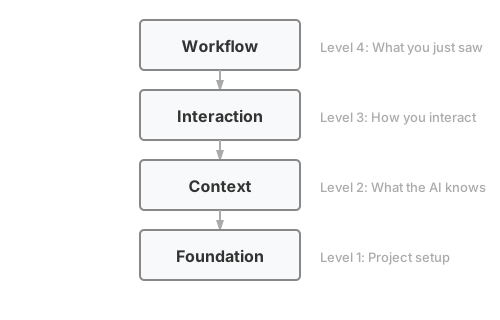
This diagram shows Claude Code’s primitives. Other AI assistants have different building blocks: Cursor has rules and .cursorrules, Windsurf has Cascade workflows. The layers matter more than the specific implementation.
The screencast showed the workflow. The rest of this post explains what makes it work, layer by layer from top to bottom.
The Two Phases of intelligent Engineering
Shaping AI is preparation. You define agentic workflows, set up tooling, provide context, and build a prompt library. Context includes coding guidelines, architecture patterns, and deployment patterns. This is the work before you write code.
Leading AI is execution. You move through the development cycle: ideation, research, feature specs, architecture, stories, code, test, deploy. This is the work of building software, with AI as a collaborator.
The screencast showed Leading AI in action. But Leading AI only works well when Shaping AI is done right. Most of this post focuses on Shaping AI, the setup that makes everything else possible.
We’ve written more about this framework on the Sahaj website.
Level 4: The Workflow
This workflow mirrors how many teams already work: pick up a card, groom it, discuss the approach, TDD the implementation. Your team might work differently. intelligent Engineering is about shaping AI to match your existing practices, not adopting a prescribed workflow. The stack exists to encode how your team works. You should be shaping AI, not letting it shape you. This example shows one approach; yours will look different.
Here’s what the screencast showed, step by step:
1. Pick Up Work
> /pickup

## Available Stories by Priority

### P0 - Critical
- #23 - S01.3: Profile Completion [module:customer]

Which card would you like to pick up?
2. Design Discussion
Here’s what the design discussion looks like:
I've read #23 and the customer domain docs. Here's my understanding:

**What we're building:**
- Profile completion endpoint (PUT /api/v1/customers/{id}/profile)
- Validation: name, DOB (18+), SSN format, address
- SSN encryption before storage

**Proposed approach:**
1. Add ProfileRequest DTO with validation annotations
2. Extend CustomerService with completeProfile method
3. Add encryption service for SSN

**Questions:**
- Should SSN validation reject obvious invalid patterns (000-00-0000)?
- Should we allow profile updates after initial completion?
This is Leading AI in action. The AI proposes, the human validates and refines. Agreement on approach before code.
3. TDD Implementation
Test-Driven Development (TDD) is a discipline where you write tests before code. The cycle is Red-Green-Refactor: write a failing test (red), write minimum code to pass (green), clean up (refactor). Kent Beck’s Test-Driven Development by Example is the canonical reference.
With agreement on approach, the TDD skill takes over:
Running in interactive mode...

RED: Writing test for profile completion with valid data
The TDD skill supports multiple review modes that control when you review AI’s work. Interactive mode pauses after each red-green cycle; batch and autonomous modes give more flow with less oversight.
The AI writes a failing test:
@Test
void shouldCompleteProfile_whenAllFieldsValid() {
    var request = aProfileRequest()
        .withFirstName("John")
        .withLastName("Doe")
        .withDateOfBirth(LocalDate.of(1990, 1, 15))
        .withSsn("123-45-6789")
        .build();

    var result = customerService.completeProfile(customerId, request);

    assertThat(result.status()).isEqualTo(PROFILE_COMPLETE);
}
And runs it:
Test written. Running...
❌ FAILED: completeProfile method doesn't exist

RED confirmed. Ready for GREEN?
This continues through each acceptance criterion with small commits after each cycle.
4. Context Updates
If you use /pickup to start work, context updates happen automatically when the story completes. The /update-context command is for when you need to update docs outside the standard workflow:
> /update-context

Recent changes:
- Added ProfileRequest DTO
- Added completeProfile to CustomerService
- Added SSN encryption

Context docs to review:
- docs/context/domain/customer.md (profile rules)
- docs/context/modules/customer-module.md (new endpoint)
- docs/context/current-state.md (mark feature built)

Proceed with updates?
5. Push to Main
Trunk-based development. Small commits. Direct to main.
git push origin main
Story auto-closes via the Closes #23 footer in the final commit.
That’s the workflow. Now let’s understand what makes it possible.
Level 3: The Interaction Layer
This is how you interact with the AI during development. The examples use Claude Code primitives, but the concepts transfer to other tools:
| Tool | Equivalents |
|---|---|
| Cursor |
Rules (.cursorrules), custom instructions |
| GitHub Copilot |
Custom instructions (.github/copilot-instructions.md) |
| Windsurf | Workflows, rules |
| OpenAI Codex | AGENTS.md, skills |
Claude Code organizes these into distinct primitives: commands, skills, and hooks. Each serves a different purpose.
Design Principles
Whether you use Claude Code, Cursor, or another tool, these principles apply:
Description quality is critical. AI tools use descriptions to discover which skill to activate. Vague descriptions mean skills never get triggered. Include what the skill does AND when to use it, with specific trigger terms users would naturally say.
# Bad
description: Helps with testing

# Good
description: Enforces Red-Green-Refactor discipline for code changes.
             Use when implementing features, fixing bugs, or writing code.
Single responsibility. Each command or skill does one thing. /pickup selects work. /start-dev begins development. Combining them makes both harder to discover and maintain.
Give goals, not steps. Let the AI decide specifics. “Sort by priority and present options” beats a rigid sequence of exact commands. The AI can adapt to context you didn’t anticipate.
Include escape hatches. “If blocked, ask the user” prevents infinite loops. AI will try to solve problems; give it permission to ask for help instead.
Progressive disclosure. Keep the main instruction file concise. Put detailed references in separate files that load on-demand. Context windows are shared: your skill competes with conversation history for space.
Match freedom to fragility. Some tasks need exact steps (database migrations). Others benefit from AI judgment (refactoring). Use specific scripts for fragile operations; flexible instructions for judgment calls.
Test across models. What works with a powerful model may need more guidance for a faster one. If you switch models for cost or speed, verify your skills still work.
Commands
Commands are user-invoked. You type /pickup and something happens.
Here’s the command set I use:
| Command | Purpose |
|---|---|
/pickup |
Select next issue from backlog |
/start-dev |
Begin TDD workflow on assigned issue |
/update-context |
Review and update context docs after work |
/check-drift |
Detect misalignment between docs and code |
/tour |
Onboard newcomers to the project |
Each command is a markdown file in .claude/commands/ with instructions for the AI:
# Pick Up Next Card

You are helping the user pick up the next prioritized story.

## Instructions

1. Fetch open stories using GitHub CLI
2. Sort by priority (P0 first, then P1, P2)
3. Present options to the user
4. When selected, assign the issue
5. Show issue details to begin work
The /tour command walks through project architecture, module structure, coding conventions, testing approach, and domain glossary. It turns context docs into an interactive onboarding experience.
Skills
Skills are model-invoked. The AI activates them automatically based on context. If I ask to “implement the registration endpoint,” the TDD skill activates without me saying /tdd.
| Skill | Triggers On | Does |
|---|---|---|
tdd |
Code implementation requests | Enforces Red-Green-Refactor |
review |
After code changes | Structured quality assessment |
wiki |
Wiki read/write requests | Manages wiki access |
The TDD skill is the one I use most:
Trigger: User asks to implement something, fix a bug, or write code
Workflow:
- RED: Write a failing test, run it, confirm it fails
- GREEN: Write minimum code to pass, run tests, confirm green
- REFACTOR: Clean up while keeping tests green
- COMMIT: Small commit with issue reference
Review modes control how much human oversight:
| Mode | Review Point | Best For |
|---|---|---|
| Interactive | Each Red-Green cycle | Learning, complex logic |
| Batch AC | After each acceptance criterion | Moderate oversight |
| Batch Story | After all criteria complete | Maximum flow |
| Autonomous | Agent reviews continuously | Speed with quality gates |
I typically use interactive mode for unfamiliar code and batch-ac mode for well-understood patterns. I mostly use batch-story and autonomous modes for demos, though they’d suit repetitive work with well-established patterns.
The review skill provides structured feedback:
## Code Review: normal mode

### Blockers (0 found)

### Warnings (2 found)
1. **CustomerService.java:45** Method exceeds 20 lines
   - Consider extracting validation logic

### Suggestions (1 found)
1. **CustomerServiceTest.java:112** Test name could be more specific

### Summary
- Blockers: 0
- Warnings: 2
- Suggestions: 1
- **Verdict**: NEEDS ATTENTION
The autonomous TDD mode uses this skill with configurable thresholds. “Strict” interrupts on any finding. “Relaxed” only stops for blockers.
Hooks
Hooks are event-driven. They run shell commands or LLM prompts at specific lifecycle events: before a tool runs, after a file is written, when Claude asks for permission.
| Event | Use Case |
|---|---|
PostToolUse |
Auto-format files after writes |
PreToolUse |
Block sensitive operations |
UserPromptSubmit |
Validate prompts before execution |
Example: auto-format with Prettier after every file write:
{
  "hooks": {
    "PostToolUse": [{
      "matcher": "Write|Edit",
      "hooks": [{
        "type": "command",
        "command": "npx prettier --write \"$FILE_PATH\""
      }]
    }]
  }
}
The credit-card-lending project doesn’t use hooks yet. They’re next on the list.
Other Primitives
Claude Code has additional constructs I haven’t used in this project:
| Primitive | What It Does | When to Use |
|---|---|---|
| Subagents | Specialized delegates with separate context | Complex multi-step tasks, context isolation |
| MCP | External tool integrations | Database access, APIs, custom tools |
| Output Styles | Custom system prompts | Non-engineering tasks (teaching, writing) |
| Plugins | Bundled primitives for distribution | Team-wide deployment |
Start with commands, skills, and context docs. Add the others as your needs grow.
Level 2: Context Documentation
Context is what the AI knows about your project. I’ve seen teams underinvest here. They write a README and call it done, then wonder why AI assistants keep making the same mistakes.
What’s missing is your engineering culture. The hardest part isn’t the tools, it’s capturing what your team actually does. For example, code reviews are hard because most time goes to style, not substance. “Why isn’t this using our logging pattern?” “We don’t structure tests that way here.” Without codification, AI applies its own defaults. The code might work, but it doesn’t feel like your code.
When you codify your team’s preferences, AI follows YOUR patterns instead of its defaults. Style debates shift left: instead of the same argument across a dozen pull requests, you debate once over a document. Once the document reflects consensus, it’s settled.
What to Document
I’ve settled on this structure:
| File | Purpose |
|---|---|
overview.md |
Architecture, tech stack, module boundaries |
conventions.md |
Code patterns, naming, git workflow |
testing.md |
TDD approach, test structure, tooling |
glossary.md |
Domain terms with precise definitions |
current-state.md |
What’s built vs planned |
domain/*.md |
Business rules for each domain |
modules/*.md |
Technical details for each module |
The credit-card-lending project extends this with integrations.md (external systems) and metrics.md (measuring iE effectiveness). Adapt the structure to your domain’s needs.
These docs exist for both AI and human consumption, but discoverability matters. New team members shouldn’t have to hunt through docs/context/ to understand what exists. The credit-card-lending project solves this with a /tour command: run it and get an AI-guided walkthrough covering architecture, conventions, testing, and domain knowledge. This transforms static documentation into an interactive onboarding flow. Context docs become working tools, not forgotten reference material.
Context Doc Anatomy
Every context doc starts with “Why Read This?” and prerequisites:
# Testing Strategy

## Why Read This?

TDD principles, test pyramid, and testing tools.
Read when writing tests or understanding the test approach.

**Prerequisites:** conventions.md for code style
**Related:** domain/ for business rules being tested

---

## Philosophy

We practice Test-Driven Development as our primary approach.
Tests drive design and provide confidence for change.
This helps AI tools (and humans) know whether they need this file and what to read first.
Dense facts beat explanatory prose. Compare:
“Our testing philosophy emphasizes the importance of test-driven development. We believe that writing tests first leads to better design…”
vs.
“TDD: Red-Green-Refactor. Tests before code. One assertion per test. Naming:
should{Expected}_when{Condition}.”
The second version is what AI tools need. Save the narrative for human-focused documentation.
Living Documentation
Stale documentation lies confidently. It states things that are no longer true. You write tests to catch broken code. Your documentation needs the same capability.
The credit-card-lending project handles this two ways:
- Definition of Done includes context updates: Every story card lists which context docs to review. The AI won’t let you forget. You can bypass it by working without your AI pair or deleting the prompt, but the default path nudges you toward keeping docs current.
-
Drift detection: A
/check-driftcommand compares docs against code
The second point catches what the first misses. I’ve seen projects where features get built but current-state.md still shows them as planned. Regular drift checks catch this before it causes confusion.
Patterns for Teams
The examples above work within a single repository. At team and org level:
Shared context repository: A company-wide repo with organization-level conventions, security requirements, architectural patterns. Each project references it but can override.
Team-level customization: Team-specific CLAUDE.md additions for their domain, their tools, their workflow quirks.
Prompt library: Reusable prompts for common tasks. “Review this PR for security issues” with the right context attached.
Level 1: Foundation
The foundation is what the AI sees when it first encounters your project.
CLAUDE.md
This is your project’s instruction manual for AI assistants. It goes in the repository root and contains:
- Project context: What this is, what it does
- Git workflow: Commit conventions, branching strategy
- Context file references: Where to find domain knowledge, conventions, architecture
- Tool-specific instructions: Commands, scripts, common tasks
Here’s an excerpt from the credit-card-lending CLAUDE.md:
# CLAUDE.md

## Project Context
Credit card lending platform built with Java 25 and Spring Boot 4.
Modular monolith architecture with clear module boundaries.

## Git Workflow
- Trunk-based development: push to main, no PRs for standard work
- Small commits (<200 lines) with descriptive messages
- Reference issue numbers in commits

## Context Files
Read these before working on specific areas:
- `docs/context/overview.md` - Architecture and module structure
- `docs/context/conventions.md` - Code standards and patterns
- `docs/context/testing.md` - TDD principles and test strategy
CLAUDE.md is dense and factual, not explanatory. It tells the AI what to do, not why. The “why” lives in context docs.
Project Structure
Structure matters because AI tools use file paths to understand context. I’ve found this layout works well:
project/
├── CLAUDE.md                    # AI instruction manual
├── .claude/
│   ├── commands/                # User-invoked slash commands
│   └── skills/                  # Model-invoked capabilities
├── docs/
│   ├── context/                 # Dense reference documentation
│   │   ├── overview.md
│   │   ├── conventions.md
│   │   ├── testing.md
│   │   └── domain/
│   ├── wiki/                    # Narrative documentation
│   └── adr/                     # Architectural decisions
└── src/                         # Your code
The separation between context/ (for AI consumption) and wiki/ (for humans) is intentional. Context docs are dense facts. Wiki pages explain concepts with diagrams and narrative. ADRs (Architectural Decision Records) capture why significant decisions were made. This context prevents future teams from wondering “why did they do it this way?”
Takeaways
The credit-card-lending repository demonstrates everything discussed above. Here’s what I learned applying it.
What Worked
Small batches: Most commits are under 100 lines. This makes review meaningful and rollbacks clean.
Context primacy: The AI reads conventions.md before writing code. It knows our test naming patterns, package structure, and error handling approach without me repeating it.
TDD skill with review modes: Interactive mode for complex validation logic. Batch-ac mode for straightforward CRUD operations.
Living documentation: Every completed story updates current-state.md. I know what’s built by reading one file.
What We Learned
Context docs need maintenance: Early on, I’d update code without updating context docs. The AI would then generate code following outdated patterns. The /check-drift command catches this now.
Skills are better than scripts: I started with bash scripts for workflows. Moving to skills let the AI adapt to context instead of following rigid steps.
Design discussion matters: Agreeing on approach before coding feels slow. In reality, it saves rework.
Getting Started
Ready to try this? Here’s a path:
If You’re Starting Fresh
- Create
CLAUDE.mdwith your project context - Add
docs/context/conventions.mdwith your coding standards - Start with one command:
/start-devfor TDD workflow - Add context docs as you need them
If You Have an Existing Project
- Create
CLAUDE.mdcapturing how you want the project worked on - Document your most important conventions
- Add the
/update-contextcommand so documentation stays current - Gradually expand context as you work
Try It Yourself
Clone the example repository and explore:
git clone https://github.com/javatarz/credit-card-lending
cd credit-card-lending
Run /tour to get an interactive walkthrough of the project structure, setup, and key concepts. Then try /pickup to see available work or /start-dev to see TDD in action.
The branch blog-ie-setup-jan2025 contains the exact state referenced in this post.
What’s Next
If you try this approach, I’d like to hear what works and what doesn’t. The practices here evolved from experimentation. They’ll keep evolving.
Credits
The intelligent Engineering framework was developed in collaboration with Anand Iyengar and other Sahajeevis. It was originally published on the Sahaj website.